In This Guide
No single tool runs a patent practice end to end. So the real question for 2026 isn't which AI to buy, it's how to assemble a stack and where the gaps are. Get that wrong and it shows up on a deadline. A firm standardizes on one impressive platform, runs search and drafting through it for months, then works down the filing checklist and hits the one thing it never produced: the drawings. They still have to be formatted to meet 37 CFR 1.84 before filing review, and they're the layer most platforms skip.
So map each tool to the work it actually does. A patent moves through a few distinct stages, prior-art search, drafting, prosecution, document review, and figures, and the tool that owns one stage is usually missing from the next. Here's the 2026 stack, layer by layer, with the names worth knowing in each and the question to ask before you rely on it.
TL;DR: the 2026 patent AI stack
Skip to the map if you want the short version. Each row is a layer of real patent work, the tools worth evaluating there, and the one thing to check before you trust the output.
| Work layer | Tools to evaluate | What the practitioner gets | What to verify |
|---|---|---|---|
| Prior-art search | PatSnap, IPRally, Solve Intelligence | Reference discovery, semantic search, patent-family context, prior-art analysis, and search exports. | Patent corpus, jurisdiction coverage, family data, citation handling, export format, and how the attorney validates results. |
| Drafting and prosecution | DeepIP, Solve Intelligence | Invention disclosure intake, claim and specification workflows, office-action support, and patent-focused review. | Word or platform integration, source traceability, claim support, prosecution workflow, figure support, and pricing. |
| Legal AI workspaces | Harvey, Legora | Legal research, document workflows, review, collaboration, and firm-scale AI workspaces. | Practice-area fit, integrations, permissions, data controls, and whether patent-specific workflows are included. |
| General AI assistance | ChatGPT, Claude | Brainstorming, query expansion, inventor interview prep, checklist creation, and summaries of provided materials. | Approved use policy, confidentiality controls, data settings, and whether the output is only working material. |
| Patent drawings | PatentDrawingAI | Source-image generation, redraw edits, Auto-Label reference numerals, Drawing Set assembly, Matter Management, and filing-ready export. | Image inputs, line-art quality, labels, formal sheets, PDF/PNG/SVG export, matter organization, and final filing review. |
| Final legal review | Practitioner and firm workflow | Claim scope, disclosure strategy, reference characterization, drawing accuracy, and filing decisions. | Who signs off on the work product before it enters the filing package. |
Prior-art search: use a search engine, not a chatbot
Search is its own discipline. The job is to find references, map them to your claims, and leave a trail an attorney can defend. A model that can summarize a patent is not the same thing as a system that can find one. This is the layer for purpose-built tools: PatSnap for patent analytics and landscape analysis, IPRally for semantic patent search and reference discovery, and Solve Intelligence, which folds prior-art analysis into its patent platform. The patent office is moving on this too. In late 2025 the USPTO opened its Automated Search Pilot, which can provide participating applicants with AI-assisted search results before examination even begins. ChatGPT and Claude can help you brainstorm search strings or digest a reference you already have, but neither should ever be the database of record behind an opinion or a filing decision.
Drafting and prosecution: DeepIP and Solve Intelligence
This is where purpose-built patent AI has pulled clear of the generalists, and two names lead it.
DeepIP, publicly reported as founded in 2024, lives inside Microsoft Word and goes straight at drafting time. Public reporting says it raised a $15M Series A in 2025. DeepIP says it has helped draft more than 8,500 applications, counts firms like Schwegman among its users, and reports cutting drafting time by roughly half. Solve Intelligence takes the platform route: Solve says more than 500 IP teams use its platform and that its product covers drafting, prosecution, claim charts, and litigation. Its Series B and Palito.ai acquisition have been publicly reported. Both make the same case for buying vertical over general: patent work needs technical and jurisdictional depth that a broad legal tool doesn't reach.
Their core is text: disclosures, claims, specifications, office-action responses. Both have since added figure features too. DeepIP generates line-art figures inside Word and keeps reference numerals synced across the spec, claims, and drawings; Solve auto-labels figures and preps them for export. So the real question isn't whether they touch drawings, it's whether a figures feature bolted onto a drafting suite is enough, or whether you want a dedicated drawing tool you can run on its own. The PatentDrawingAI vs DeepIP and PatentDrawingAI vs Solve Intelligence comparisons go deeper on the drawing-specific tradeoffs.
Legal AI workspaces: Harvey and Legora
Harvey
Harvey is the biggest name in legal AI. It hit roughly an $11 billion valuation in 2026, with recent rounds led by Sequoia and GIC and OpenAI's Startup Fund as an early backer, and is used by tens of thousands of lawyers. It started general and has built real IP muscle. In early 2026 it shipped patent and IP-litigation workflow templates for infringement claim charts, invalidity contentions, an office-action analyzer, license agreements, and filing documents like application data sheets and declarations. If your firm already runs Harvey, extending it into patent prosecution is an easy call.
What Harvey's public materials reviewed for this article do not describe is a dedicated patent drawing workflow. Harvey's IP output is documents and analysis, so the figure slot stays open in any Harvey-based stack. The Harvey patent drawings guide takes that question on directly.
Legora
Legora, formerly Leya and based in Stockholm, is the firmwide-workspace play. It reached about $5.6 billion after a $600 million Series D and is built around legal research, drafting, and large-scale document review. Its Tabular Review feature turns an entire document set into a structured grid, and firms like Bryan Cave Leighton Paisner, with 1,200 lawyers, and Goodwin have deployed it firmwide. It's edging toward IP, and practitioners already use it to spot claim amendments, but for now it's a generalist research-and-review layer with patent capability growing at the margins.
Like Harvey, Legora's public materials reviewed for this article do not describe a dedicated patent drawing workflow. The Legora patent drawings guide breaks down that gap.
General AI assistants: ChatGPT and Claude
ChatGPT and Claude are the utility players. Use them at the edges of a matter. They'll help you rough out claim angles, widen a search query, write inventor-interview questions, or summarize something you paste in. None of that makes either one a patent search engine, a drafting platform, or a drawing tool.
Two cautions. First, decide before anyone uploads unfiled invention details what your data settings and client obligations actually permit; consumer terms are not enterprise terms. Second, treat a generated image as a sketch of an idea, not a deliverable. It still needs every drawing-specific control that 37 CFR 1.84 demands. The ChatGPT patent drawings guide walks through the general-assistant case, and the Nano Banana patent drawings guide covers the stronger image-model version of the same issue.
Patent drawings: where PatentDrawingAI fits
The generalists skip this layer, and the drafting suites bolt a figures feature onto a much bigger product. PatentDrawingAI is the dedicated, standalone version of it. It starts from what inventors and patent teams already have on hand: a sketch, a product photo, a screenshot, a slide diagram, or a CAD render exported as a PNG, JPG, or WebP. It returns a patent drawing in about one to three minutes per figure.
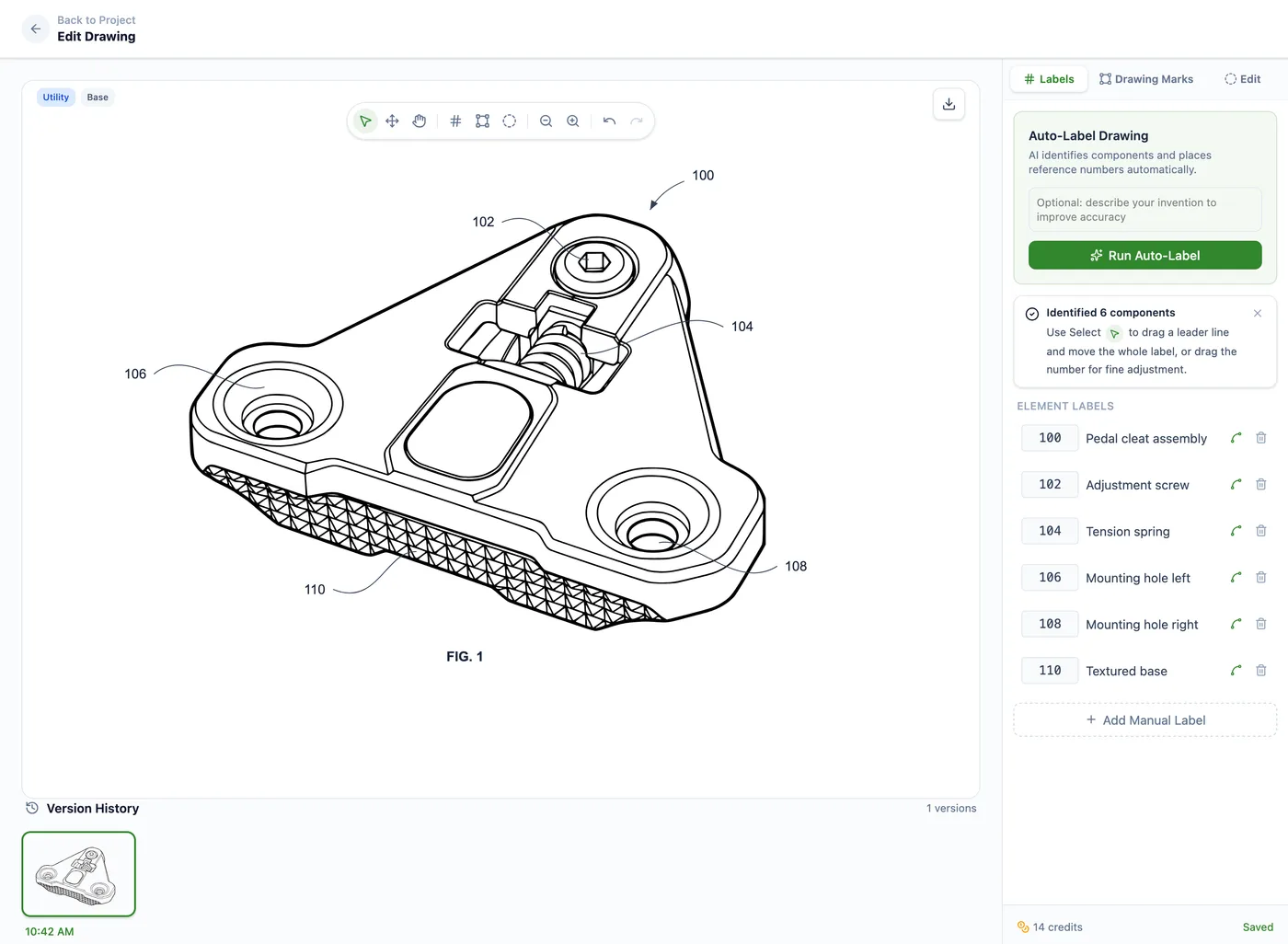
And it doesn't stop at the raw AI image, which is the whole point. You refine the figure with plain-English edits such as "add thread detail to the screw," "remove the side extrusion," or "lighten the top surface." Auto-Label finds the components and drops in numbered reference labels with leader lines. Manual tools handle hatching, drawing marks, and whiteout. Drawing Set assembly lays the figures onto formal sheets, with the margins, sheet numbering, and figure labels formatted to meet 37 CFR 1.84. You export filing-ready PDF, PNG, or SVG, with DXF linework where a CAD workflow needs it.
For firms, Matter Management keeps it organized by client, matter, docket number, responsible attorney, and drawing type, with CSV import and usage exports for billing. Compare it against the field in the best patent drawing software guide.
The output is complete on its own. You review the set and file it, the same way you'd check any drawings before they go to the USPTO. PatentDrawingAI isn't a law firm and doesn't give legal advice. It produces and formats the drawings. The filing judgment stays with you.
PatentDrawingAI drawing editor
Comparison: AI tools for patent attorneys in 2026
| Tool | Primary layer | Useful for | Not enough for | Pricing visibility |
|---|---|---|---|---|
| PatSnap | Patent search and IP intelligence | Prior-art discovery, patent analytics, patent landscapes, and portfolio context | Patent drawing production or legal signoff | Product and plan dependent |
| IPRally | AI patent search | Semantic patent search, reference discovery, and prior-art review support | Application drafting or patent drawing production | Contact vendor |
| DeepIP | Patent drafting and patent workflows | Invention disclosure, claims, specification, prosecution, review, and patent-focused workflow support | Verify drawing inputs, formal sheets, exports, and pricing if evaluating it for figures | Contact vendor |
| Solve Intelligence | Patent drafting, prosecution, and prior-art-related workflows | Prior-art analysis, claim charts, office-action response, drafting, and patent-focused review | Verify drawing inputs, formal sheets, exports, and pricing if evaluating it for figures | Contact vendor |
| Harvey | Legal AI workspace | Legal research, document workflows, analysis, drafting support, and review | Dedicated patent drawing production unless separately documented | Contact vendor |
| Legora | Legal AI workspace | Research, drafting, review, collaboration, and document-heavy legal workflows | Focused patent drawing production unless separately documented | Contact vendor |
| ChatGPT / Claude | General AI assistance | Brainstorming, query expansion, checklists, inventor interview prep, and summaries of provided materials | Purpose-built patent search, drafting, prosecution, or drawing workflows | Public self-serve tiers plus business plans |
| PatentDrawingAI | Focused patent drawing workflow | Drawings from image inputs, redraw edits, Auto-Label, Drawing Set assembly, Matter Management, and PDF/PNG/SVG export | Legal advice, prior-art search, claim drafting, or prosecution strategy | Public pricing from $19/month |
Two patterns jump out. Most of the patent-specific and enterprise tools hide pricing behind a sales call, so treat "contact vendor" as a real cost, and get supported inputs, export formats, and review workflow in writing before you commit. And only one row is a dedicated, self-serve drawing tool with public pricing; the rest either skip figures or fold them into a larger platform you buy through sales.
How to choose the right patent AI tools
Start with your bottleneck, not a vendor list. Losing hours finding references? Look at search. Drowning in claims, specs, and office actions? Look at DeepIP or Solve. Need firmwide research and review? That's Harvey or Legora. Figures holding up filings? Go straight at the drawing layer instead of hoping a text tool covers it. It won't.
Drawing workflow checklist
- Can the tool start from the source images inventors actually have?
- Can it generate clean line art instead of only descriptive text?
- Can it place reference numerals and leader lines?
- Can it assemble figures onto formal sheets around 37 CFR 1.84 formatting? The patent drawing rules and guidelines guide explains the drawing-rule side in more detail.
- Can it export filing-ready PDF, PNG, and SVG drawing sets?
- Can a firm organize drawing work by client, matter, docket number, and responsible attorney?
PatentDrawingAI is built around those six questions, and it sits beside whatever else you run: PatSnap, IPRally, DeepIP, Solve, Harvey, Legora, ChatGPT, Claude, or a plain manual workflow. It's the one piece you can pick up on its own, from $19 a month, purpose-built for that drawing checklist, whether or not the rest of your stack touches figures.
For the broader decision, compare this with the best patent drawing software comparison, PatentDrawingAI vs DeepIP, and PatentDrawingAI vs Solve Intelligence. Those pages go deeper on the drawing-specific tradeoffs this stack guide summarizes.
Frequently Asked Questions
Patent teams commonly evaluate prior-art search tools such as PatSnap and IPRally, patent-specific drafting and prosecution tools such as DeepIP and Solve Intelligence, legal AI workspaces such as Harvey and Legora, general assistants such as ChatGPT and Claude, and focused tools such as PatentDrawingAI for filing-ready patent drawings.
Patent teams often evaluate search and intelligence products such as PatSnap and IPRally for prior-art discovery, patent landscapes, semantic search, family data, and reference review. Solve Intelligence also describes prior-art-related workflows as part of its patent platform, so it belongs on the research and drafting boundary.
They are better treated as general AI assistants. ChatGPT and Claude can help with brainstorming, query expansion, inventor interview prep, and summaries of materials a practitioner provides, but they are not purpose-built patent search, drafting, prosecution, or drawing systems.
No, not by default. Harvey and Legora can be useful for legal work and document-heavy workflows, but patent drawings still need a way to create line art, place reference numerals, assemble formal sheets, and export PDF/PNG/SVG drawing sets.
Current public materials for DeepIP and Solve Intelligence describe patent-specific workflows that can include figure, drawing, or prior-art-related capabilities. That makes them different from general legal AI platforms, but buyers should verify supported inputs, outputs, formal sheet formatting, reference numeral handling, pricing, and review process directly with each vendor.
PatentDrawingAI is the focused drawing layer. It turns a sketch, photo, screenshot, slide diagram, or CAD render exported as an image into a filing-ready drawing, supports Auto-Label reference numerals, assembles formal drawing sheets, and exports PDF, PNG, and SVG sets.
Not reliably. Patent work still separates into legal judgment, search, drafting, prosecution, review, drawings, sheet formatting, and filing decisions. The safer approach is to map each tool to the layer it actually covers.
Sources
- 37 CFR 1.84 - Standards for drawings
- USPTO patents information
- PatentDrawingAI product page
- USPTO Automated Search Pilot
- PatSnap Analytics
- IPRally official site
- DeepIP official site
- Business Insider DeepIP Series A reporting
- Solve Intelligence official site
- Harvey official site
- Business Insider Harvey funding reporting
- Legora official site
- The Australian Legora Series D reporting
- ChatGPT overview
- Claude official site
- Google Developers Blog - Gemini 2.5 Flash Image
Create Filing-Ready Patent Drawings
Upload a clear source image, generate a patent drawing, add reference numerals, assemble formal sheets, and export PDF, PNG, or SVG in one workflow.
See What We'll Draw