In This Guide
Overview
If you're asking whether Harvey does patent drawings, the answer is no. Harvey is a legal AI platform built for the text-and-analysis side of patent work: research, document review, prosecution responses, and claim charts. It doesn't generate the figures that go on your drawing sheets. There's no Harvey feature that turns an invention into line art, places reference numerals, lays out formal sheets, and exports a drawing set.
That matters because a patent matter splits into different kinds of work. Some of it is language and analysis, which is Harvey's home turf. The figures are something else: formatted line art under a drawing standard. Harvey can sit in the legal AI layer of your stack, but the drawing step needs its own tool. For the full stack, see the AI tools for patent attorneys guide.
If you ever need to test a tool for the figure step, judge it by output, not marketing. Can it turn a source image into patent line art, keep reference numerals tied to the figure, arrange figures on formal sheets, and export files your team reviews before filing? Harvey does none of those. That's the gap this page is about.
What Harvey covers for legal teams
Harvey is one of the biggest names in legal AI. It reached about an $11 billion valuation in 2026, with recent rounds led by Sequoia and GIC and the OpenAI Startup Fund as an early backer, and it's used by tens of thousands of lawyers. It started as a general platform for law firms and has built real IP capability on top.
For patent teams, Harvey works across the prosecution and litigation lifecycle. It analyzes patent filings, helps prepare filing documents like application data sheets and declarations, and drafts structured responses to Section 101, 102, 103, and 112 rejections. In early 2026 it shipped patent and IP-litigation workflow templates for infringement claim charts, invalidity contentions, an office-action analyzer, license agreements, and filing documents. A junior associate running one of those workflows gets output structured the way a partner would expect, with citations in place.
That's real value for the text-heavy parts of patent practice. But every bit of it is language and analysis. None of it is a drawing. Harvey's IP output is documents: arguments, charts, and filings. The figures are a separate job, which is the next section.
Why patent drawings are a different workflow
A patent drawing isn't just another document. Under 37 CFR 1.84, drawings have to meet rules on sheet size, margins, line quality, lettering, reference characters, shading, figure identification, and numbering. The specification and claims explain the invention in words. The drawing set has to show it, on formal sheets, to those rules.
So the figure step is a production task, not a writing task. It needs source images or views, line-art generation, cleanup, labels, reference numerals, leader lines, sheet layout, figure numbering, and export. A tool that writes and analyzes legal text doesn't solve any of that, the same way a word processor can't draft your claims.
This is also why the honest wording is "drawings formatted to meet 37 CFR 1.84," not a promise that any drawing will be accepted in every filing. The USPTO reviews drawings on its own terms, and a practitioner still checks the set before it goes out. The real product question is whether a workflow hands you a filing-ready set to review, not whether a chatbot can recite the rules. For the formal rules themselves, see the patent drawing rules and guidelines guide.
What the figure workflow needs
A drawing workflow has to start from the actual visual source: a sketch, product photo, screenshot, slide diagram, or CAD render exported as an image. From there it has to produce clean patent line art and keep the figure editable enough to fix details before export. Here's the short checklist that separates a real drawing tool from a text tool that can only talk about drawings.
| Workflow need | Why it matters |
|---|---|
| Source-image intake | Patent drawings start from visible invention material, not only prompts or legal text. |
| Line-art generation | The output needs clean black-and-white figure work that can be reviewed, labeled, and placed on a sheet. |
| Reference numerals and leader lines | Patent figures need numbered references that correspond to the written description. |
| Formal drawing sheets | Figures need margins, sheet numbering, figure labels, and layout controls before filing review. |
| Export and matter organization | Patent teams need PDF/PNG/SVG exports and, for firm work, client, matter, docket, and responsible-attorney context. |
Use that checklist on any vendor, Harvey included. If a platform can't show source-image input, figure output, reference-numeral handling, formal-sheet assembly, and export formats, it isn't the drawing layer of your stack. The best patent drawing software comparison goes deeper on that decision, and the same output test applies to Legora patent drawings when you're weighing broad legal AI workspaces.
Questions to ask before treating Harvey as the drawing layer
- Can the workflow accept sketches, product photos, screenshots, slide diagrams, or CAD renders exported as PNG, JPG, or WebP images?
- Does it produce patent line art that a practitioner can inspect, edit, label, and place on formal drawing sheets?
- Can it place and adjust reference numerals, numbered reference labels, and leader lines tied to visible components?
- Does it assemble sheets with margins, sheet numbering, figure labels, and layout controls around 37 CFR 1.84?
- Can the team export a complete drawing set as PDF, PNG, and SVG, and keep client, matter, docket, and responsible-attorney context around repeat drawing work?
How PatentDrawingAI fills the drawing layer
PatentDrawingAI is built for exactly the figure layer Harvey leaves open. Upload a sketch, product photo, screenshot, slide diagram, or CAD render exported as an image, and it generates a filing-ready patent drawing in about one to three minutes. From there you refine with plain-English instructions like "add more thread detail to the screw," "remove the extra side extrusion," or "lighten the top surface."
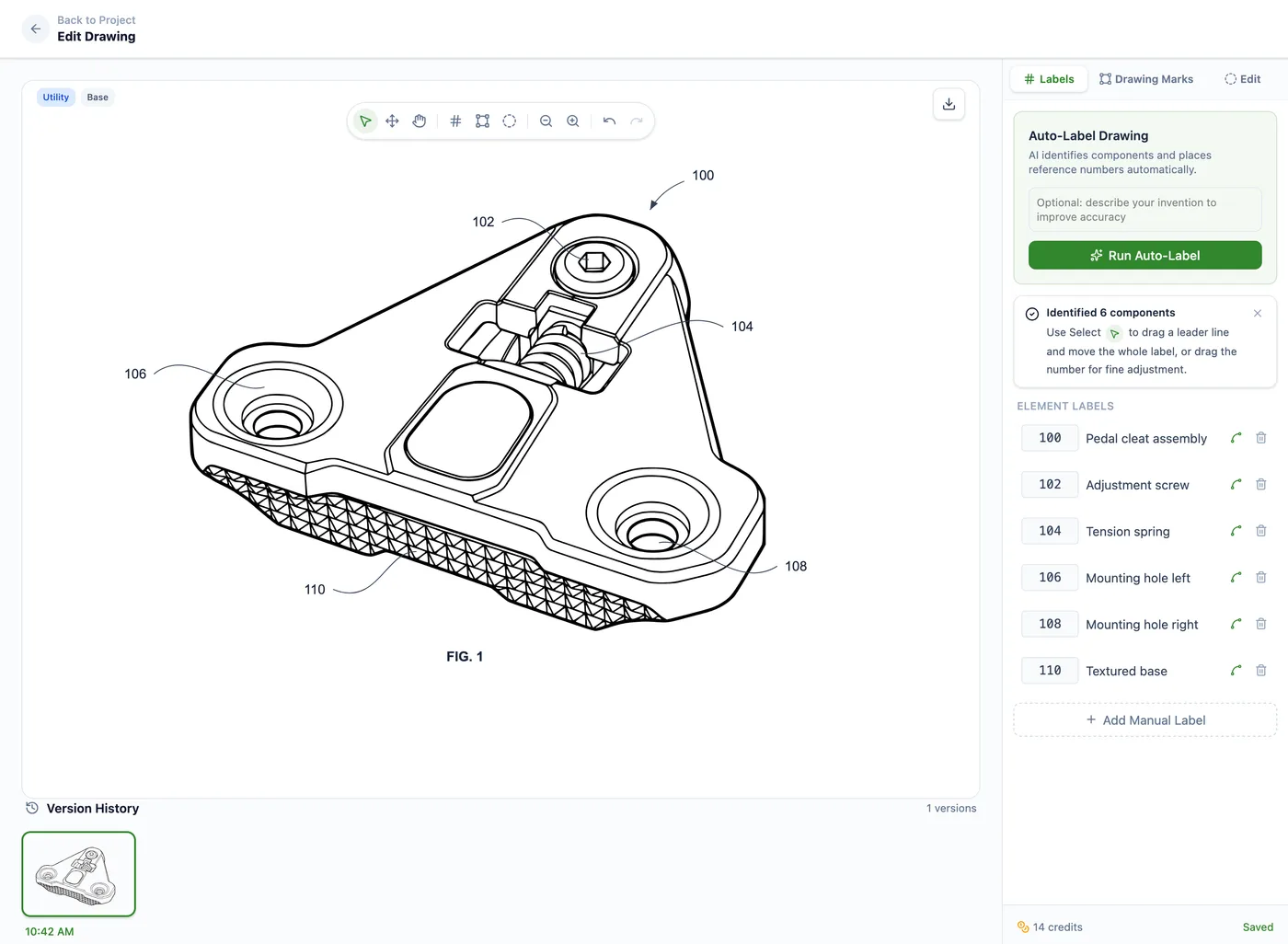
The work stays in one place after generation. Auto-Label places reference numerals and leader lines. Manual annotation handles labels, shapes, hatching, and whiteout regions. Drawing Set assembly arranges figures on formal sheets with margins, sheet numbering, and figure labels formatted to meet 37 CFR 1.84. You export the set as PDF, PNG, or SVG, with DXF linework for CAD workflows where supported. It covers both utility and design drawings.
For firms, Matter Management adds an operating layer around the drawing work: client and matter organization, docket or matter numbers, responsible attorney, drawing type, CSV matter import, and usage export for billing or internal review. It isn't a full docketing or billing system, and doesn't try to be. It's the matter-aware workflow around the figures. Files stay private by default with encrypted storage, and PatentDrawingAI doesn't train AI models on customer uploads or generated drawings. Pricing is public, from $19 per month, at roughly $2 to $4 per drawing. PatentDrawingAI isn't a law firm and gives no legal advice; it produces and formats the drawings, and the filing decisions stay with you.
PatentDrawingAI drawing editor
Using Harvey and PatentDrawingAI together
Harvey and PatentDrawingAI solve different layers, so they sit side by side instead of competing. Use Harvey for the text-heavy legal work, the office-action response or the claim chart. Bring in PatentDrawingAI when the matter needs figures that require line art, reference numerals, formal sheets, and export. One works in language, the other in line art, and neither steps on the other.
Bring the drawing workflow in before final filing review, once you know which figures the matter needs. That heads off the usual bottleneck, where the legal work is moving but the figures are still a manual task waiting on a draftsperson. Plan the figure step up front, next to your drafting and prosecution tools, and it stops being a deadline scramble.
If you're mapping a full patent AI stack, use the AI tools for patent attorneys guide as the hub. For a drawing-specific comparison, best patent drawing software covers the purpose-built options, and if your firm is also weighing Legora, compare this with the Legora patent drawings guide.
Frequently Asked Questions
No. Harvey's IP output is documents and analysis: office-action responses, claim charts, invalidity contentions, and filing documents. It doesn't create patent figures, illustrations, or formatted drawing sheets. For figures you need a dedicated drawing tool like PatentDrawingAI, or a draftsperson.
No. Formatting a drawing to 37 CFR 1.84 means handling sheet size, margins, line quality, reference characters, shading, and numbering, which is an illustration task, not a text task. Harvey doesn't produce that kind of file. PatentDrawingAI assembles drawings formatted to meet those requirements, and you review the set before filing.
PatentDrawingAI is built for the figure layer. It turns a sketch, photo, screenshot, slide diagram, or CAD render, supplied as an image, into a filing-ready drawing in about one to three minutes per figure, for both utility and design patents, with editing, Auto-Label reference numerals, formal-sheet assembly to 37 CFR 1.84, and PDF/PNG/SVG export.
Yes. Harvey covers prosecution and litigation work but not figures, so the drawing step stays open. Firms pair Harvey with a dedicated drawing tool like PatentDrawingAI, or send figures to a draftsperson, to finish the job.
No. Harvey doesn't produce drawings, so there's nothing for it to replace on the figure side. A tool like PatentDrawingAI can take over much of the manual drawing work by generating figures you review and file yourself, but the legal and filing calls stay with the practitioner.
Yes, and that's the normal setup. Harvey sits in the legal AI layer for text-heavy work; PatentDrawingAI handles the figure layer. Use Harvey for the prosecution response or claim chart, and PatentDrawingAI when the matter needs filing-ready drawings, labels, formal sheets, and export.
Sources
Create Filing-Ready Patent Drawings
Upload a clear source image, generate a patent drawing, add reference numerals, assemble formal sheets, and export PDF, PNG, or SVG in one workflow.
See What We'll Draw