Quick answer
Filing-date rule
For non-design applications filed on or after December 18, 2013, the USPTO can accord a filing date even if drawings are omitted.
Disclosure rule
A drawing is still required when it is necessary to understand the subject matter sought to be patented.
Best practice
Prepare provisional figures close to non-provisional quality when the invention has visual structure, mechanisms, or geometry.
Definition
What are provisional patent drawing requirements?
Provisional patent drawing requirements are the practical standards a figure must meet to be useful in a provisional patent application. The formal rules are more relaxed than for a non-provisional utility application, but the disclosure standard is not relaxed.
A provisional application under 35 U.S.C. 111(b) does not require claims. USPTO guidance also says a provisional can receive a filing date regardless of whether drawings are submitted. But the same USPTO page advises applicants to file drawings needed to understand the invention, because a necessary drawing cannot be added later without new-matter risk.
That is the difference that matters. Provisional drawings do not have to look perfect, but they need to show the invention clearly enough to support the non-provisional application you may file within the next 12 months.
The practical rule
If a future claim will depend on a physical feature, geometry, connection, internal mechanism, process step, or system relationship, show it in the provisional drawings or describe it clearly in the written specification.
Required vs recommended
Are drawings required in a provisional application?
Not always. MPEP 601 explains that, for applications other than design applications filed on or after December 18, 2013, the USPTO can accord a filing date even if the application does not contain drawings. That does not make drawings optional in the practical sense.
Under 35 U.S.C. 113, an applicant must furnish a drawing where necessary to understand the subject matter sought to be patented. When the invention is mechanical, electrical, product-based, or hard to explain in words alone, drawings are usually the clearest way to provide that disclosure.
For a pure method, chemistry, or business-process filing, drawings may be less central. For a device, system, assembly, user interface, manufacturing method, or mechanical structure, skipping drawings is usually a weak bet.
Priority support
The priority-date trap
The value of a provisional application is the early filing date. That date only helps later claims if the provisional actually supports them. 35 U.S.C. 112(a) requires a written description of the invention in full, clear, concise, and exact terms.
If the later non-provisional adds a feature, view, or embodiment that the provisional did not disclose, you can run into new-matter and written-description problems. 35 U.S.C. 132 says no amendment may introduce new matter into the disclosure.
The safest practice is to prepare the provisional drawings close to the standard you would want for the later non-provisional. That does not mean every sheet must be perfect before a provisional filing, but it does mean the views should be complete and understandable.
Relaxed form is not relaxed content
The USPTO does not examine provisional applications for patentability, and formal drawing objections usually arise later. But priority support is measured by what the provisional actually disclosed on the filing date.
Disclosure checklist
Show every feature you may later claim
Before filing, make a short claim-support checklist. List the parts, assemblies, relationships, process steps, and alternative embodiments you may care about during the next year. Then check whether each one appears in the drawings or is clearly described in the text.
This matters most for features that are hard to explain without an image: internal mechanisms, sectioned geometry, fasteners, electronic modules, UI states, exploded assemblies, material interfaces, and relative positions.
For the broader rules that govern formal drawing sets, use the patent drawing rules and guidelines hub. For the specific USPTO checklist, see the USPTO patent drawing requirements guide.
Format
Format and legibility standards
A provisional drawing can be less formal than a non-provisional drawing, but it still has to be readable in the official record. Treat format as a way to protect clarity, not as decoration.
| Item | Practical guidance |
|---|---|
| Paper and sheet size | Use 8.5 by 11 inch or A4 sheets when practical so the figures can move cleanly into later filing work. |
| Line quality | Use dark, clear linework that will reproduce well. Avoid faint pencil, gray lines, blurry scans, and low-contrast photos. |
| Figure labels | Label views as FIG. 1, FIG. 2, and so on when you use multiple figures, and keep those labels consistent with the written description. |
| Reference numerals | Not usually enforced as a provisional formality, but numbered components make the later non-provisional specification cleaner. |
| View coverage | Include enough angles, sections, exploded views, or detail views to show each feature you may later claim. |
Labels
Reference numerals: optional in practice, valuable in use
Reference numerals are not usually the reason a provisional filing succeeds or fails at filing intake. They are still worth adding because they connect the figures to the written description.
In non-provisional drawings, 37 CFR 1.84 contains detailed rules for numbers, letters, and reference characters. The same part should use the same reference character across views, and characters must be plain and legible. Following that discipline in the provisional makes the later non-provisional easier to prepare.
A clean numeral system also helps reviewers, investors, patent counsel, and future you understand which feature is which. That is why the provisional vs non-provisional patent drawings comparison treats numbering as one of the biggest workflow differences.
View coverage
Include enough views to fully disclose the invention
The most expensive omission is often a missing view. A single perspective image may not show hidden geometry, internal components, attachment points, backside features, method steps, or alternatives.
For physical products, consider perspective, front, side, top, exploded, section, and detail views. For software or electronics, consider flowcharts, block diagrams, UI states, signal paths, and system diagrams. The right number is the number needed to make the invention clear.
If you need a step-by-step workflow for building those views, use the how many drawings for a provisional patent guide and the how to make patent drawings workflow.
PatentDrawingAI
Generate provisional drawings without a separate illustration workflow
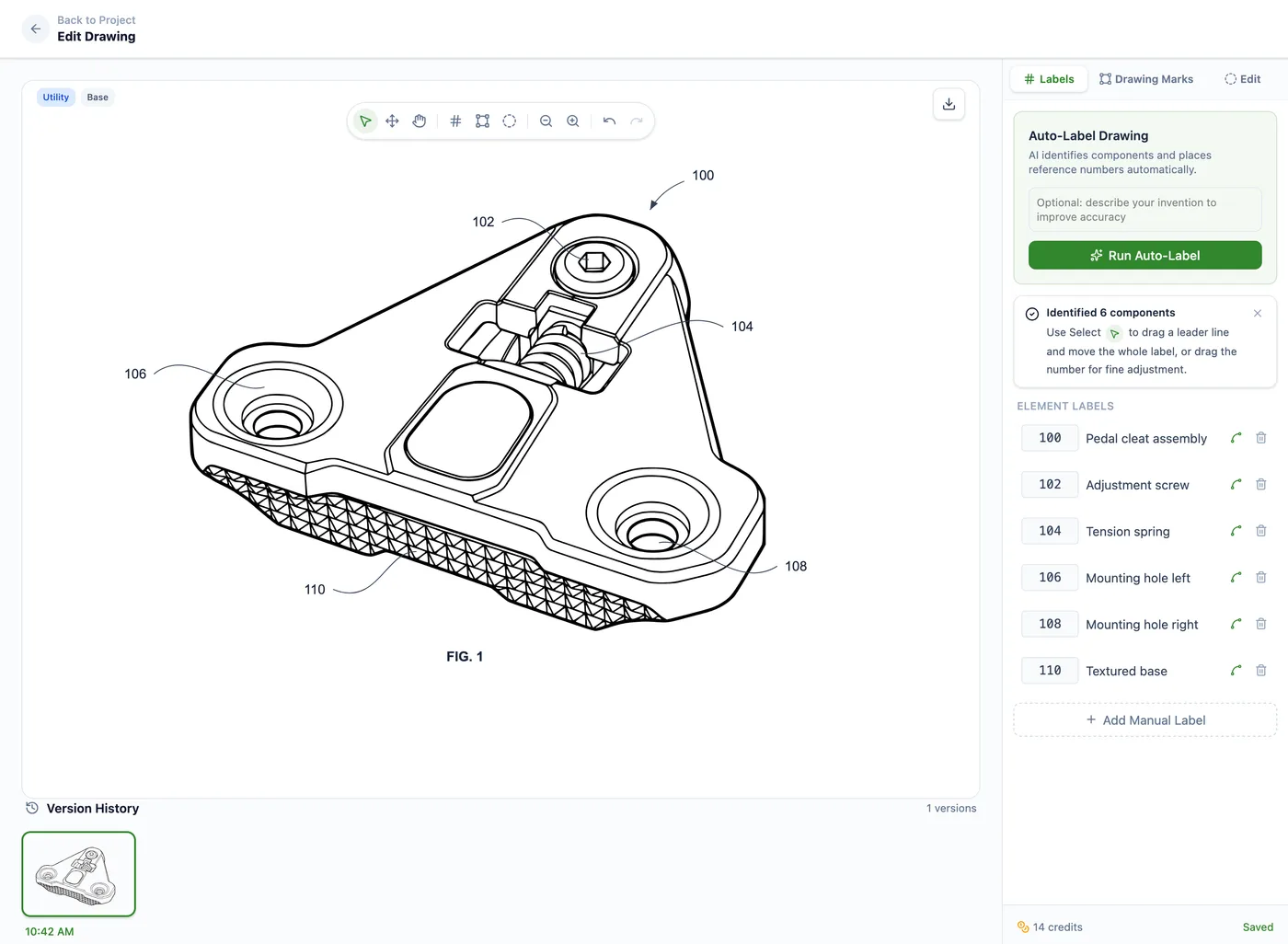
PatentDrawingAI helps turn source images into filing-ready patent drawings that you can review, label, assemble into sheets, and export. Upload a sketch, product photo, or CAD render as an image. The AI creates clean patent line art in about 1-3 minutes per figure, then the editor lets you adjust labels, leader lines, drawing marks, and version history before export.
For provisional filings, that workflow is useful because speed and disclosure both matter. You can create more complete view coverage without waiting days for a manual illustration cycle, then reuse or refine the same figures for the later utility application.
PatentDrawingAI drawing editor
Output and filing note
PatentDrawingAI exports filing-ready PDF, PNG, and SVG drawing sets. It formats drawings to meet USPTO requirements, but it is not a law firm, does not file patents, and does not guarantee USPTO acceptance.
Avoid these
Common provisional drawing mistakes
Filing text only when figures are needed
A text-only provisional may get a filing date, but it can leave mechanical, electrical, or product-shape features without visual support.
Using unclear sketches
Sketches can work, but vague shapes, missing labels, and low-contrast scans create ambiguity when you later rely on the provisional.
Omitting internal or hidden features
If a cross-section, exploded view, circuit diagram, flowchart, or detail view explains a feature you may later claim, include it now.
Changing the invention at conversion
You can clean up form, but you cannot use the later non-provisional to add subject matter that the provisional did not disclose.
Letting figures and text diverge
The written description and drawings should tell the same story, using the same names, reference numerals, and feature boundaries.
Sources
Quick references
These primary sources support the legal and procedural claims in this guide.
Related guides
Patent Drawing Rules and Guidelines
The hub for 37 CFR 1.84 drawing rules, sheet standards, numbering, and examiner issues.
Provisional vs Non-Provisional Patent Drawings
A side-by-side comparison of what changes when provisional figures move into a non-provisional filing.
How Many Drawings for a Provisional Patent?
A practical guide to choosing the right number of figures and views for a provisional filing.
Utility Patent Drawings
How non-provisional utility drawings support claims, reference numerals, views, and section details.
How to Make Patent Drawings
A practical workflow from source images to filing-ready sheets and exports.
Create provisional patent drawings before you file
Upload a sketch, photo, or CAD render and create filing-ready figures with labels, drawing marks, sheet assembly, and PDF/PNG/SVG export.
Try it freeFrequently asked questions
No. For non-design applications filed on or after December 18, 2013, the USPTO can accord a filing date without drawings. But applicants are advised to file any drawings necessary to understand the invention, and missing necessary drawings can create new-matter and priority-support problems later.
Yes. Hand-drawn sketches, scans, CAD renders, photos, and software-generated figures can all be useful in a provisional if they are legible and clearly show the invention.
Your later non-provisional can claim the provisional filing date only for subject matter the provisional actually disclosed. If a later claim depends on a feature that was not shown or described, that feature may not get the earlier date.
Use as many drawings as needed to fully explain the invention. A simple object may need one or two figures, while a mechanism, electronics assembly, software process, or multi-part product may need several views or diagrams.
They do not have to be examined for those formal standards in the provisional stage, but preparing them to that level is often the safest workflow because the figures are clearer and easier to reuse in the non-provisional application.
Yes. The key question is whether the drawings clearly show the invention and can support the written description. PatentDrawingAI creates filing-ready figures from sketches, photos, or CAD renders, then lets you label, edit, assemble, and export the drawing set.