Quick Answer: What Patent Drawing Rules Matter Most?
For most U.S. patent filings, drawings need to show the invention clearly, use the required sheet size and margins, keep line work dense and reproducible, number sheets and figures consistently, and use reference numerals that match the written description and claims.
The exact rule set depends on the filing path. Utility drawings usually center on USPTO patent drawing requirements, design drawings need enough views to disclose the claimed appearance, and provisional drawings should support what you may later claim. If you are planning a non-U.S. path, review the PCT drawing requirements and the relevant national or regional office rules before filing.
Show the claimed invention
Every claim-relevant feature should be visible in at least one figure, with consistent reference numerals.
Format the sheet correctly
Use accepted paper size, margins, sheet numbers, figure labels, and line quality that survives reduction.
Avoid later disclosure fixes
Corrected drawings can fix formality issues, but they cannot add new matter that was missing from the filing.
Understanding Patent Drawing Rules
Patent drawing compliance is more than a formatting exercise. Drawings are part of the application disclosure, and the USPTO can require corrected drawings when defects affect publication, examination, or compliance with drawing standards.
The legal basis for patent drawing rules comes from three primary sources: 35 U.S.C. § 113, 37 CFR 1.81-1.85, and the Manual of Patent Examining Procedure (MPEP) Chapter 600. Design patent drawings also have design-specific requirements under 37 CFR 1.152.
Good drawings help examiners and reviewers understand the invention before they work through the written specification and claims. Clear, compliant figures can reduce avoidable drawing objections and make the record easier to follow.
The Cost of Non-Compliance
Drawing defects can trigger a formality notice, drawing objection, or requirement for corrected drawings. MPEP 608.02(a) describes a two-month period for corrected drawings after certain OPAP notices, and missed replies can lead to abandonment. Preventive compliance is cheaper than correction work after filing.
Legal Basis for Patent Drawing Rules
Understanding where the rules come from helps clarify their importance and hierarchy.
35 U.S.C. § 113 (Drawings Statute)
35 U.S.C. § 113 requires a drawing where it is necessary to understand the subject matter sought to be patented. For applications filed under 35 U.S.C. 111 on or after December 18, 2013, MPEP 608.02 explains that a missing drawing may no longer block a filing date for most non-design applications, but it can still leave the applicant unable to rely on later drawings to fix an insufficient disclosure.
37 CFR 1.81-1.85 (Title 37 Regulations)
These sections form the U.S. drawing-rule backbone:
- •37 CFR 1.81: When drawings are required in a patent application
- •37 CFR 1.83: Drawing content, including the rule that a nonprovisional drawing must show every feature specified in the claims
- •37 CFR 1.84: Standards for drawings, including paper size, margins, line quality, lettering, views, numbering, color, and photographs
- •37 CFR 1.85: Corrections to drawings
- •37 CFR 1.152: Design patent drawings, including the requirement for enough views to constitute a complete disclosure of the design
MPEP Chapter 600 (Patent Examination Procedure)
The Manual of Patent Examining Procedure gives USPTO examiners and applicants practical drawing guidance. For drawing issues, start with MPEP 608.02 and then check the subsections for the specific defect or filing stage:
- •MPEP 608.02: Drawing requirements, missing drawings, corrected drawings, and drawing objections
- •MPEP 608.02(a): When replacement drawings are required before examination
- •MPEP 608.01(f): Brief description of drawings and figure references in the specification
General Rules for All Patent Drawings
Rule 1: Every Figure Must Be Referenced in the Specification
Each drawing sheet and figure number must appear in the written specification. If you draw FIG. 1-10, the specification must contain sentences like “FIG. 1 shows a perspective view of the invention” for each figure. Examiners flag unreferenced figures as a drawing defect.
Rule 2: Every Claimed Feature Must Appear in a Drawing
Every element, component, or feature mentioned in the claims must be illustrated in at least one drawing. If you claim “the base plate having three mounting holes,” the base plate and all three holes must be visible in one or more views. Missing claimed features are common Office Action triggers.
Rule 3: Reference Numerals Must Match Claims and Specification
If you label a component as “10” in the drawing, you must use “10” consistently throughout the specification and claims. Do not use “element 10,” “component 10,” and “the base” interchangeably. The correspondence between drawings, specification, and claims must be exact.
Rule 4: Drawings Are Part of the Disclosure
Information shown clearly in the drawings is considered part of the written disclosure. You cannot add new information to drawings during prosecution that was not in the original filing. Drawings submitted after the filing date may not be used to overcome an insufficient original disclosure.
New Matter Trap
During prosecution, you may want to improve drawing clarity by adding new views, detail, or reference numerals. If the new drawing information was not clearly disclosed in the original filing, examiners will reject it as new matter. Be conservative in prosecution: if it’s not in the original drawings, don’t add it.
Formatting Rules: The Technical Specifications
| Rule | Specification |
|---|---|
| Paper Size | 8.5" × 11" US letter or 21.0 cm × 29.7 cm A4. Use one sheet size consistently. |
| Top Margin | 2.5 cm (approximately 1 inch) |
| Left Margin | 2.5 cm (approximately 1 inch) |
| Right Margin | 1.5 cm (approximately 0.6 inches) |
| Bottom Margin | 1.0 cm (approximately 0.4 inches) |
| Ink Color | Black-and-white drawings are normally required. Utility color drawings need a granted petition; design color drawings are permitted when the required conditions are met. |
| Line Quality | Lines must be black, dense, uniformly thick, and well-defined. Broken lines are allowed only when they serve a proper patent-drawing purpose, such as environment or unclaimed subject matter. |
| Shading | Use hatching, stippling, or line shading when needed. Avoid gray fills or decorative shading that will not reproduce clearly. |
| Text in Drawings | Minimal text. Only reference numerals (1, 2, 3...), figure labels (FIG. 1, FIG. 2), and essential brief legends. No descriptive matter allowed. |
| Figure Labels | "FIG. 1," "FIG. 2," etc. Use clear consecutive numbering; the single-view exception under 37 CFR 1.84 means one standalone figure should not be labeled "FIG. 1." |
| Scale | Drawings must be large enough for all details to be clearly legible when reproduced at two-thirds (2/3) reduction. |
Why Formatting Matters
The USPTO specifies margins and paper size for a practical reason: patent drawings must remain readable when they are scanned, published, reduced, and reproduced. Margins keep drawing content inside the usable sight area. Line quality requirements keep the figure legible after publication and reduction.
Pro Tip: The 2/3 Reduction Rule
When you design your drawings, imagine them shrunk to 67% of their original size; that’s how they’ll appear in the printed patent. If text or details become illegible at that reduction, the drawing fails the test. This is why many practitioners size their reference numerals large (0.32 cm / 1/8 inch minimum height).
Numbering Rules: Figures and Reference Numerals
Figure Numbering (Sheet Numbers)
- •Format: 37 CFR 1.84 calls for two Arabic numerals separated by an oblique line, such as “1/5” and “2/5.”
- •Consecutive: Sheets must be numbered sequentially, starting with the first drawing sheet and ending with the total sheet count.
- •Placement: Sheet numbers belong within the sight, generally near the middle of the top edge unless the drawing is too close to that area.
Figure Labels
- •Format: “FIG. 1,” “FIG. 2,” etc. (not “Figure 1” or “Fig. 1”), except that a single view used to illustrate the invention should not be numbered or preceded by “FIG.”
- •Location: Below or outside the figure boundary, centered
- •Consecutive: Figures must be numbered consecutively across all sheets (FIG. 1, FIG. 2, FIG. 3... even if they span multiple sheets)
- •No gaps: Do not skip figure numbers. Partial views can use the same figure number followed by a capital letter when they form one complete view.
Reference Numerals (Element Numbers)
Reference numerals are the labels applied to specific components or features within a figure (e.g., 10 = base, 20 = motor, 30 = housing).
- •Location: Placed outside the component outline, connected by a lead line (thin line pointing to the element)
- •Size: Minimum 0.32 cm (1/8 inch) high. Large enough to remain legible at 2/3 reduction.
- •Font: Arial or standard sans-serif. No decorative fonts.
- •Consistency: The same element must use the same numeral throughout all drawings, specification, and claims
- •Numbering Strategy: Some attorneys use tens (10, 20, 30...) to allow for sub-components (11, 12, 13 for parts of element 10). Others use sequential numbering. Both are acceptable.
- •Lead Lines: Lines connecting numerals to components must be thin, straight (or minimally curved), and clearly point to the element
Common Numeral Errors
- •Numerals too small to remain legible at reduced size
- •Lead lines that are ambiguous or point to the wrong element
- •Numerals placed inside the component boundary (should be outside)
- •Inconsistent numeral use (element 10 shown as “10” in one figure, “ten” or “element 10” in the specification)
- •Missing numerals for claimed elements
Content Rules: What Can and Cannot Appear in Drawings
What IS Allowed
- •Lines and technical illustration: The entire drawing should be composed of ink lines representing the invention
- •Reference numerals: Labels for components and elements
- •Figure labels: “FIG. 1,” “FIG. 2,” etc.
- •Minimal descriptive legends: Brief labels like “Front View,” “Cross-Section A-A,” “Detail B” when necessary for clarity
- •Hatching and stippling: Shading patterns to indicate materials, cross-sections, and surface finishes
- •Broken lines: In utility patents, broken lines indicate environment or context (parts not claimed). In design patents, they indicate unclaimed portions of the design.
- •Arrows: In exploded views, flowcharts, and process diagrams to show direction, assembly, or flow
What IS NOT Allowed
- •Dimensions: Avoid unnecessary measurements or manufacturing dimensions unless they are needed to understand the invention.
- •Descriptive text: No explanatory paragraphs, sentences, or lengthy captions. Minimal text only.
- •Color: Do not use color casually. Utility color drawings require a petition, while design color drawings have their own conditions.
- •Advertising: Avoid company names, logos, trade names, model numbers, and promotional content unless a marking is legally relevant and handled properly.
- •Photographs: Photographs are not ordinary patent drawings. They may be accepted when the subject cannot be adequately represented with line drawings and the applicable requirements are satisfied.
- •Mathematical formulas: Formulas belong in the specification, not drawings, unless essential to understanding the invention’s operation
- •Decorative elements: No borders, fancy frames, or artistic embellishments beyond functional illustration
- •Trade-secret detail: Do not add manufacturing detail that is not needed for the patent disclosure.
The Dimensions Trap
Many inventors want to show exact dimensions in drawings to make the drawing clearer. In many patent drawings, dimensions create more risk than value because they can imply unnecessary limits. If a measurement matters, handle it deliberately in the specification and claims rather than treating the drawing as a manufacturing blueprint.
View Rules: How to Display Your Invention
Standard View Types
Perspective Views
3D isometric or perspective representation. Shows overall form factor and spatial relationships. Usually FIG. 1. Gives examiners immediate understanding of the invention.
Orthographic Views
Front, back, top, bottom, left, right: standard engineering views. Each reveals details hidden in others. Required for complex mechanical inventions.
Cross-Sectional Views
Internal structure revealed by "cutting" through the invention. Essential for understanding internal mechanisms, layers, or hidden features. Labeled "Section A-A" with matching cutting line in main view.
Exploded Views
Components separated along assembly axes, showing how they fit together. Dashed lines or arrows indicate assembly relationships. Critical for mechanical inventions.
Detail Views
Enlarged close-ups of small or complex features. A circled region in the main view is expanded to show fine detail. Labeled "Detail A" with corresponding letter in main view.
Flowcharts & Block Diagrams
For software, methods, and processes. Show sequence of steps, decision points, data flow. Each block labeled with reference numeral and brief description.
View Labeling and Arrangement Rules
- •Identify every view: Use clear FIG. numbering and brief descriptions in the specification. Add view legends only when they help clarify the drawing.
- •Cross-section indicators: If a view is a cross-section, show the cutting line in the main view with matching letters (e.g., “Section A-A”)
- •Detail callouts: If enlarging a detail, circle or highlight the region in the main view, then label the enlarged view (e.g., “Detail A,” “Detail B”)
- •Logical flow: Arrange views logically: perspective first (overview), then orthographic, then details. This helps examiners follow the drawing set.
- •Partial views: A partial view (showing only part of the invention) is allowed if labeled clearly and necessary to show a specific feature
Multiple Sheets
When you have many figures, spread them across multiple sheets. Each sheet should have the sheet number (e.g., “1/5”), and figures continue sequentially (Sheet 1: FIG. 1-2, Sheet 2: FIG. 3-4, etc.). This is for clarity and for consistent publication.
Special Cases and Advanced Rules
Color Drawings
Black-and-white line drawings are the normal format for U.S. utility applications. Utility color drawings are accepted only after the USPTO grants a petition explaining why color is necessary as the only practical medium for disclosure. Design applications can include color drawings or color photographs when the conditions in 37 CFR 1.84 are met.
Photographs
Photographs are not ordinary patent drawings. The USPTO accepts them when they are the only practical medium for showing the subject matter, such as certain gels, blots, cell cultures, tissue cross sections, crystalline structures, or metallurgical structures. If the subject can be shown clearly with line drawings, expect the Office to prefer drawings.
Informal Drawings
Practitioners often use the phrase “informal drawings” for sketches, photos, or CAD renders exported as images that explain the invention before a fully formatted drawing set is ready. For provisional filings, the priority-support question is whether the figures disclose the invention clearly enough. For nonprovisional filings, the USPTO can still require corrected drawings if the submitted drawings do not meet publication, examination, or 37 CFR 1.84 requirements.
Software and Method Patents
For software and business method patents, drawings typically consist of flowcharts and block diagrams rather than mechanical illustrations. Each step or process block must be labeled with a reference numeral and brief description. The flowchart must show the sequence of operations, decision points, and data flow. Data structures can be represented as tables or diagrams.
Flowchart Best Practices
Flowchart symbols should follow standard conventions (rectangles for steps, diamonds for decisions, arrows for flow). Each box must be labeled with a reference numeral and a brief description. Do not mix software flowcharts with mechanical drawings on the same sheet unless they are clearly separated and labeled.
International Considerations
If you are filing internationally under the Patent Cooperation Treaty (PCT) or in specific countries, patent drawing rules vary. Treat this as a planning overview, then verify the office-specific rules for the filing path you actually use.
| Patent Office | Key Differences from USPTO |
|---|---|
| USPTO | U.S. utility and design drawings use the 37 CFR 1.84 framework, with design-specific rules in 37 CFR 1.152. Letter-size and A4 drawing sheets are both allowed. |
| WIPO/PCT | PCT Rule 11.13 sets international drawing requirements. If a filing may enter multiple national phases, prepare drawings conservatively and check the receiving office's current requirements. |
| EPO / European Phase | European requirements are not identical to U.S. practice, and older Rule 46 references can be stale because Rule 46 was deleted from the EPC text effective February 1, 2023. Verify current EPO guidance before filing. |
| Other National Offices | National-phase offices can apply local formalities. Do not assume a drawing set accepted in one office automatically satisfies every jurisdiction without review. |
International Strategy
If you are filing in multiple jurisdictions, create conservative drawings that are clear at reduction, avoid unnecessary words, and use consistent reference numerals. A4-friendly layouts are often helpful for international work, but no single checklist promises acceptance in every national or regional office.
Quick Reference Card: Patent Drawing Rules at a Glance
Use this table as a handy checklist before submitting drawings:
| Category | Rule | Yes/No |
|---|---|---|
| Paper | 8.5" × 11" (US) or A4 (21.0 × 29.7 cm) | ✓ |
| Margins | Top 2.5 cm, Left 2.5 cm, Right 1.5 cm, Bottom 1.0 cm | ✓ |
| Ink | Black only (no color unless petitioned) | ✓ |
| Lines | Dense, uniform, well-defined. Legible at 2/3 reduction | ✓ |
| Shading | Hatching, stippling, or spaced lines. No solid gray | ✓ |
| Text | Minimal. Only reference numerals, FIG. labels, brief legends | ✓ |
| Numerals | At least 0.32 cm (1/8") high. Outside components. Lead lines to elements | ✓ |
| Sheet Numbers | Consecutive "1/5", "2/5", etc. within the sight, typically near the top middle | ✓ |
| Figure Labels | "FIG. 1", "FIG. 2", etc. Consecutive across all sheets, with the single-view exception | ✓ |
| View Labels | Front View, Side View, Section A-A, Detail A; clear and concise | ✓ |
| Claimed Elements | Every element in claims appears in at least one drawing | ✓ |
| Specification Reference | Every figure referenced in specification text | ✓ |
| Numeral Consistency | Same numeral used for same element throughout drawings, spec, claims | ✓ |
| Dimensions | Usually avoid drawing dimensions unless needed for understanding | ✗ |
| Advertising/Logos | Avoid branding, promotional text, and unnecessary words | ✗ |
| Photographs | Generally not accepted unless the subject cannot be shown with line drawings and requirements are met | ✗ |
| Broken Lines | Only to show environment or unclaimed matter | ✓ |
Common Violations and Their Consequences
Violation: Missing or Incorrect Reference Numerals
Consequence: The USPTO may issue a drawing objection or require corrected drawings. The delay depends on the notice, filing stage, and response timing.
Prevention: Cross-check claims against drawings. Every element in the claims must have a numeral in a drawing.
Violation: Poor Line Quality
Consequence: The Office may object if line density or uniformity makes the figure unsuitable for publication or examination.
Prevention: Use drawing software, vector tools, or filing-ready AI drawing tools that can preserve dense, clean line work.
Violation: Incorrect Margins
Consequence: Incorrect margins can make the sheet unsuitable for publication or require correction before the application moves forward.
Prevention: Use templates. Most modern drawing tools allow you to set exact margin sizes. Verify margins before submission.
Violation: Missing Figure Labels or Incorrect Numbering
Consequence: Incorrect sheet or figure numbering can create a drawing objection or require corrected sheets.
Prevention: Create a figure numbering checklist. Verify that figures are sequential and labeled consistently.
Violation: Text or Dimensions in Drawings
Consequence: The Office may require correction if text, dimensions, or explanatory matter makes the drawing noncompliant or hard to reproduce.
Prevention: Keep drawings clean. Move all descriptive information to the specification.
Violation: Claimed Elements Missing from Drawings
Consequence: If a nonprovisional drawing fails to show every claimed feature, the examiner may require additional illustration or raise a disclosure issue depending on the record.
Prevention: Before finalizing drawings, review all independent claims and ensure every element is illustrated.
Violation: Inconsistent Reference Numerals
Consequence: If FIG. 1 shows element “10” as the motor, and FIG. 2 shows the same motor as “15,” the examiner may object or ask for clarification.
Prevention: Create a reference numeral legend before drawing. Assign each element a permanent number and use it consistently.
How AI Helps With Patent Drawing Rule Compliance
Manual compliance with all these rules is time-consuming and error-prone. AI-assisted tools can reduce the formatting, labeling, and sheet-assembly work:
Automatic Formatting
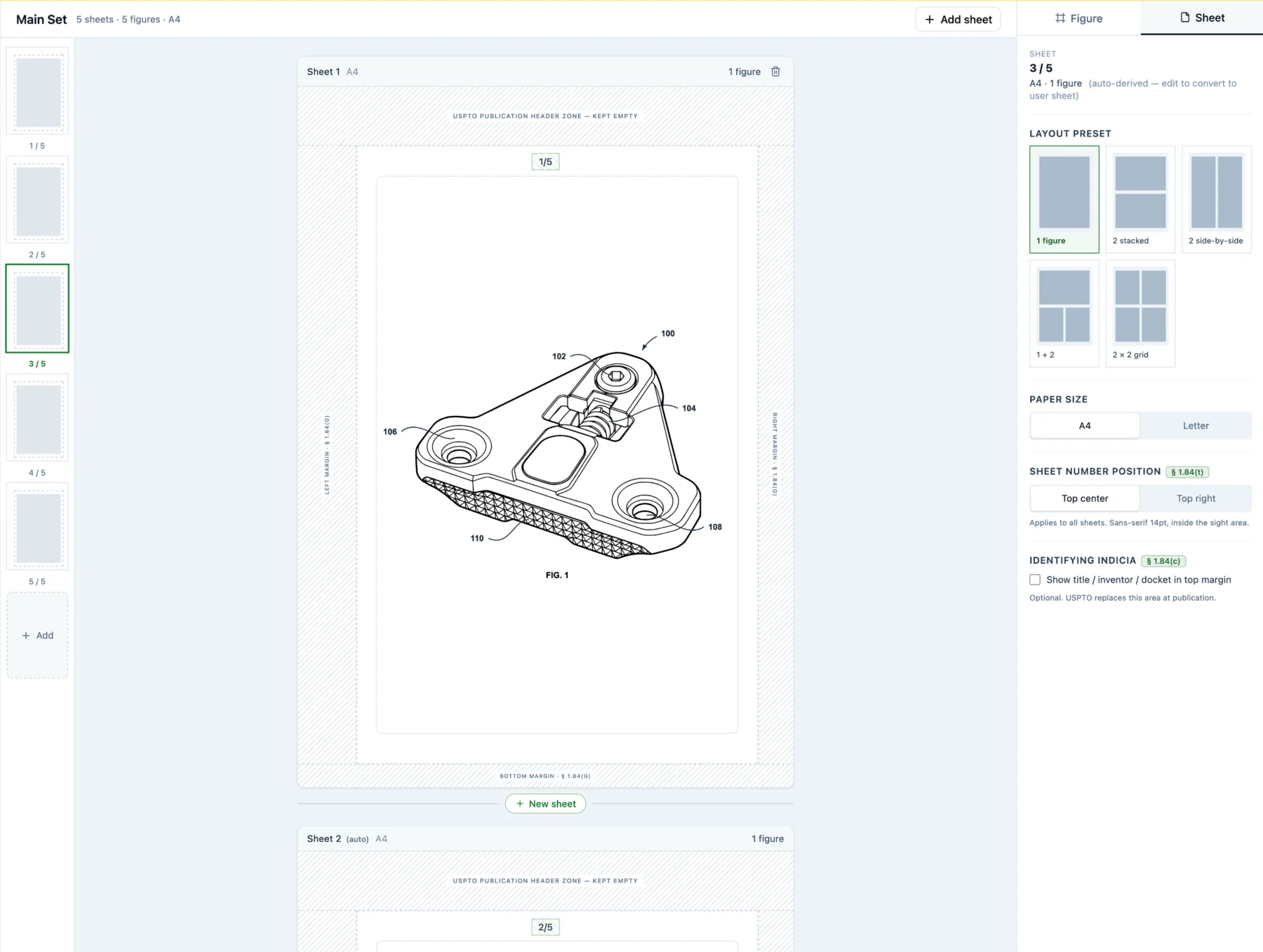
PatentDrawingAI helps apply drawing-sheet formatting, paper size, and line-art preparation in one workflow. If you upload a sketch, product photo, or CAD render exported as an image, the tool helps prepare the figure for filing-ready sheets without manual page setup.
Reference Numeral Generation
PatentDrawingAI's Auto-Label can identify components in an image and place numbered reference labels with leader lines. You can drag labels and leader lines by hand when a component name or placement needs adjustment.
View Generation and Multi-Sheet Layouts
You can create needed patent views: front, side, top, perspective, detail, or section views, from clear uploaded source images and CAD renders exported as images. The sheet workflow then helps arrange figures across multiple sheets with sheet numbering and consecutive figure labels.
Compliance Checking
Before export, drawing tools can flag common formatting issues such as figure placement, text content, margin accuracy, reference numeral consistency, and sheet numbering. That review can reduce avoidable correction cycles, but final filing review remains the user's responsibility.
Specification-Drawing Correlation
Before filing, use a claim-to-figure checklist to compare the written description against the drawings. The goal is simple: every claimed feature should be visible, and every figure should be described in the specification.
PatentDrawingAI sheet assembly
The AI Advantage
Manual drawing review can take meaningful attorney, paralegal, or illustrator time. PatentDrawingAI reduces the formatting and labeling work by keeping generation, labels, drawing marks, sheet review, and export in one workflow. It helps catch common issues, but it does not promise USPTO acceptance or replace legal review.
Source Links for Patent Drawing Rules
Use these primary references when checking a filing-specific drawing issue. For workflow help, see our guide to how to make patent drawings and our page on utility patent drawings. If you would rather not format figures to these rules by hand, compare the best patent drawing software and see how each option handles §1.84 formatting.
Ensure Your Patent Drawings Comply
Upload sketches, photos, or CAD renders exported as images. PatentDrawingAI helps create filing-ready figures, labels, drawing marks, and sheet exports while flagging common formatting issues before submission.
Validate Your DrawingsFrequently Asked Questions
Missing or incorrect reference numerals. Examiners frequently flag elements mentioned in claims that don't have corresponding numerals in drawings. The solution: cross-check every claim element against drawings before submission. Use a reference numeral legend to ensure consistency.
Sometimes, but do not rely on later drawings to add disclosure. A provisional application can include sketches, photos, or CAD-render images if they make the invention understandable. In a nonprovisional application, the USPTO can require corrected drawings when drawing defects interfere with publication, examination, or compliance. Later drawings cannot add new matter that was missing from the original filing.
Photographs are not the normal format for utility or design patent drawings. They may be accepted when the subject matter cannot be adequately shown with line drawings, such as some biological, metallurgical, or microscopic subject matter. Color photographs follow the color-drawing conditions, and utility color drawings require a petition.
Usually no. Patent drawings are meant to disclose the invention clearly, not serve as manufacturing blueprints. If a measurement matters to patentability or claim scope, handle it carefully in the written specification and claims rather than adding unnecessary dimensions to the drawing field.
The USPTO may issue a formality notice, drawing objection, or requirement for corrected drawings, depending on the defect and application stage. MPEP 608.02(a) describes a two-month period for corrected drawings after certain OPAP notices, and missed replies can lead to abandonment. The safer approach is to check margins, line quality, sheet numbering, figure labels, and reference numerals before filing.