Turn any sketch, photo, or CAD render into filing-ready patent drawings.
PatentDrawingAI generates clean line art, places reference numerals, and assembles formal drawings formatted to 37 CFR §1.84, ready to export and file in minutes. Files stay private and never train AI.
Join 200+ inventors and patent attorneysNo credit card · Free upload & analysisThe math changes when the whole workflow lives in one tool.
Patent drawings have always been slow, outsourced, and billed by the figure. A purpose-built tool changes every row below.
Join the 200+ inventors and patent attorneys who already made the switch.
Traditional costs are typical market ranges and vary by provider and complexity. PatentDrawingAI effective cost assumes plan credits: a new drawing is 5 credits; AI redraw edits are 1 credit; everything else is included.
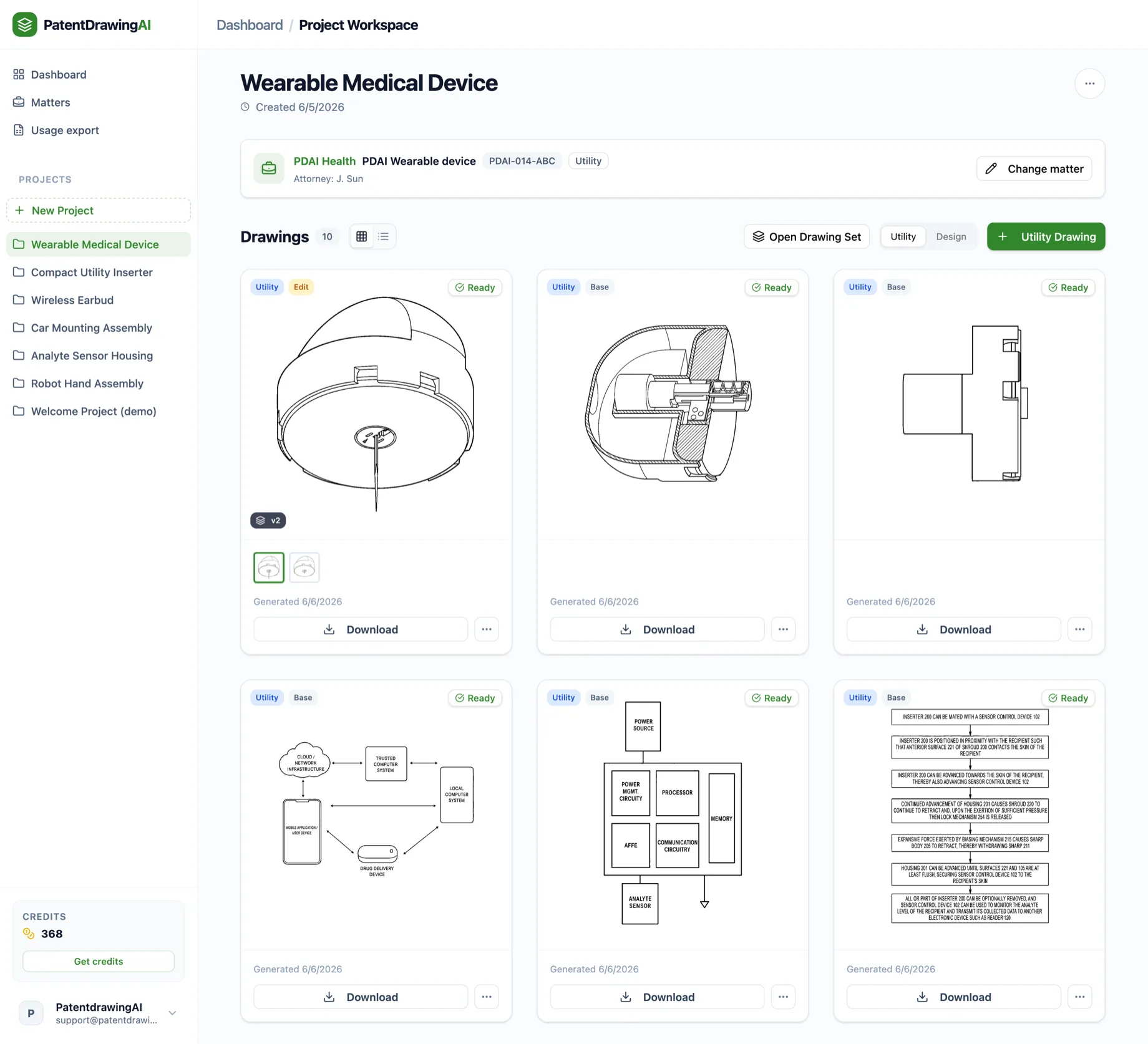
Every drawing type a filing needs, in one workspace.
Isometric views, cross-sections, block diagrams, and flowcharts live in one project, and §1.84-ready downloads are one click away.
Six stages. One tool. No outsourcing required.
Start with a photo or sketch and finish with filing-ready sheets. Every stage you see below happens in the same workspace.
Upload + Generate
Photo in, line art out
Clean + Vectorize
Background removed, crisp vectors
Edit in English
Select a region, describe the fix
Auto-Label
Reference numerals, placed for you
Assemble
Sheets formatted to §1.84
Export
Compliance checked, filing-ready
Formatted to 37 CFR §1.84, then checked before it leaves.
Margins, sight area, sheet numbering: the rejections that waste your afternoon are handled structurally.
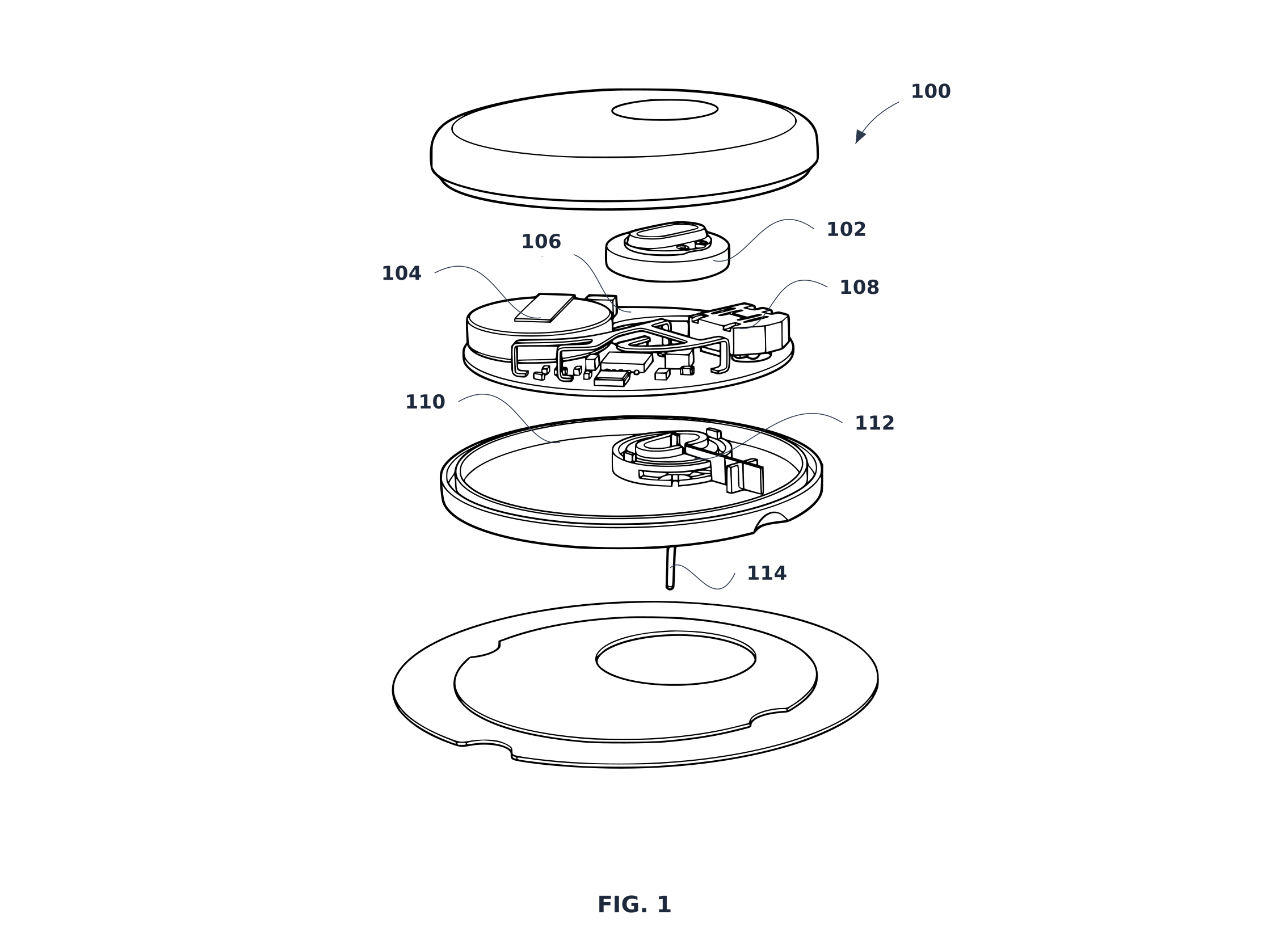



37 CFR §1.84
Sight area enforced
Figures are placed inside the usable area with §1.84 margins (A4 or Letter), so nothing drifts into the publication header zone.
Sheet numbering validated
“1/5 → 5/5” checked on every export. Duplicate or reused reference numerals are flagged before you file, not after.
A receipt, not a promise
The export dialog shows the checks passing: a concrete signal the set is formatted to file.
Pre-filing material demands more than a privacy policy.
Built to pass your firm's security review. We answer security questionnaires, and maintain a current subprocessor list.
Never trains AI
Uploads, prompts, and drawings are never used to train models. Requests to our AI provider carry image bytes only, never the client, matter, or account context.
Private by default
Files live in private object storage, never public buckets. Access is via HMAC-signed URLs with expiry; raw storage paths are never exposed.
Encrypted & isolated
TLS in transit, encryption at rest, two-layer tenant isolation, immutable audit logs. All on SOC 2-attested infrastructure.
Yours, entirely
You keep full rights to inputs and outputs. We process images solely to deliver the service: generation, editing, labeling, assembly, export.
Runs on matters, like the rest of your practice.
Matter Management is included on every plan, with no per-seat fees.
Matter directory
Client, matter, docket number, responsible attorney, drawing type: searchable, filterable, archivable.
CSV import
Map columns from your matter system, preview duplicates and invalid rows, bulk-load in one pass.
Drawings linked to dockets
Every workspace shows its client and matter context, so no orphan files at billing time.
Usage export
Per-matter CSV by date, client, and type, with attribution preserved from the moment each credit was spent.
Only generation costs credits. Everything else is included.
Upload and analysis are free. You only need a plan to generate.
New drawing = 5 credits · AI edit = 1 credit.
Join the 200+ inventors and patent attorneys already on board.
Frequently asked questions
Is my client's invention used to train AI?+
Never. Your uploads, prompts, and generated drawings are not used to train AI models. Files are private by default, accessed through signed expiring URLs.
Do you support utility and design drawings?+
Yes, both. Each goes through generation, §1.84 sheet assembly, and export. Reference numerals (Auto-Label) apply to utility figures; design drawings rely on shading and broken lines instead.
What inputs does it take?+
Images in PNG, JPG, or WebP. Two kinds of source work: a photo, sketch, or CAD render of a physical object, or an image of a system or diagram that shows how things connect or flow, such as a block diagram, flowchart, architecture, schematic, or system overview (for example, a PowerPoint slide of a system). Native CAD files (.dwg, .step, .stl) aren't accepted directly, so export a view as an image first. DXF linework is available on export where supported.
What about complex assemblies or multiple views?+
Each figure is generated from its own source image, so multi-view sets are built figure by figure, with version history, plain-English edits, and region redraws to refine each one. Auto-Label flags reference numerals reused across figures. You stay in control of every figure before it goes on a sheet.
How does the free image analysis work?+
Create an account and upload an image. PatentDrawingAI identifies the source type and details such as reference numerals, labels, panels, and color, then shows what it will draw. You decide what's kept, what's removed, and which view is drawn before any credits are spent. Analysis is free and no card is required. Choose a plan only when you're ready to generate. Plans start at $19/month.
How do I compare PatentDrawingAI with other patent drawing software?+
If you are still evaluating tools, see our guide to the best patent drawing software in 2026, where we compare pricing, §1.84 formatting, reference numerals, exports, and law-firm fit.
See your first drawing go from upload to filing-ready.
Upload a photo, sketch, or CAD render. We'll identify what it contains and show you what we'll draw before you choose a plan. No card required.
Your files stay private and are never used to train AI. Cancel anytime.