In This Guide
Overview
Can ChatGPT make patent drawings? Sort of, but not ones you can file. ChatGPT's image generation is genuinely useful in 2026, and it can produce a picture that looks like a patent figure, which helps when you are thinking an idea through. What it cannot do is hand you a filing-ready drawing set: clean black line art, reference numerals that match your written description, figures assembled on formal sheets, and export files a practitioner reviews before filing.
First, clear up a common worry. The USPTO does not impose a special ban on AI-assisted drawing preparation in the sources reviewed. Its AI-tools guidance treats AI as a tool subject to existing duties, and the drawing still has to satisfy 37 CFR 1.84. So the problem is not that ChatGPT figures are banned. It is that the raw output rarely meets the standard, and getting it there usually means redoing the work in a tool built for it.
That puts ChatGPT in the general-assistant layer of a patent AI stack: useful for planning, not for production. The test for any tool is the output. Can it generate line art from your source material, place reference numerals and keep them consistent with the description, assemble formal sheets, and export a complete drawing set? If it stops at a single image, the drawing step is still open. For the broader stack, see the AI tools for patent attorneys guide.
What ChatGPT can do with patent figures
ChatGPT earns its place before the drawing-production step. OpenAI describes ChatGPT as a general assistant for writing, learning, research, summarizing, and image creation. For patent figures, that means it can rough out what a figure might show, sketch alternative views, or turn a concept into a picture that helps you talk it through with a co-inventor or attorney. On the text side it can write a background section or a first-pass description, though that is a separate job with its own limits on claim precision.
For figures, treat it as a sketchpad. Use it to turn a rough invention description into a possible figure list, explain terms like reference numerals and leader lines, or flag which components need labels. That work is real, and it makes the drawing problem easier to describe. It just is not the drawing set. A concept image clarifies a discussion; it is not formal figures with labeled parts, sheet numbering, margins, and export files ready for filing review.
Why a generated image is not enough
A patent drawing is a regulated artifact, not just an image. Under 37 CFR 1.84, figures have rules for black-and-white line work, sheet size, margins, views, scale, line quality, shading, reference characters, lead lines, sheet numbering, and figure numbering. Reference characters, for instance, have to be at least 3.2 mm (1/8 inch) tall and legible. Those are production details a general image model does not handle on its own.
Start with the file itself. Patent figures need crisp black line art that stays sharp at any size. ChatGPT produces images, often with shading, soft edges, perspective, or stray artifacts that patent drawing conventions do not allow. A future general image model may output vectors natively; ChatGPT is not a dedicated vector drawing-set export workflow today.
Then the labels. ChatGPT's text rendering has improved, so it can put numbers on a picture, but it will not reliably place the right reference numeral in the right spot, tie it to your written description, or keep the same component consistent across views. Editing is imprecise too: ask for one small change, such as thickening a line or moving a numeral, and it can regenerate the whole image and introduce new errors. For a drawing that has to agree with your claims, that drift is a real problem.
There is also cleanup. A consumer image model gives you an image, not a finished drawing set. Gray edges, background tint, shadows, speckle, raster-only lines: someone still has to remove the background, normalize it, convert it to clean black line art, trace it to vectors, and prepare export files. That is tedious for one figure. It becomes a workflow problem across a ten-figure application, and the problem compounds across the applications a practitioner files.
This is why the honest claim is "formatted to meet 37 CFR 1.84," not a promise of acceptance. The practitioner still reviews the set. For the rules themselves, see the patent drawing rules and guidelines guide.
The same issue comes up with stronger image-first tools. The Nano Banana patent drawings guide explains why Google's Gemini image model can make convincing patent-styled figures without finishing the drawing-set workflow.
Where ChatGPT falls short as the drawing workflow
ChatGPT is a general assistant, not a dedicated formal drawing sheet system. It can describe what a figure should contain, but the drawing workflow needs controls specific to figures, labels, sheets, and export. Here is the gap, need by need.
| Drawing need | Why ChatGPT alone is not enough | What the workflow should provide |
|---|---|---|
| Source-image accuracy | A prompt can invent or omit structure unless the visual source is kept central. | A workflow that starts from sketches, photos, screenshots, slide diagrams, or CAD renders exported as images. |
| Reference numerals | ChatGPT can suggest labels, but placement and consistency are spatial drawing tasks. | Numbered reference labels and leader lines that can be placed, adjusted, and checked. |
| Formal sheets | A generated image is not the same as an assembled drawing set. | Margins, sheet numbering, FIG. labels, scale, and multi-figure layout controls. |
| Post-processing | Consumer image output can leave gray edges, background tint, shadows, speckles, or raster-only line work. | Background cleanup, grayscale normalization, bilevel line-art prep, speckle control, vector tracing, and export preparation. |
| Export files | Patent teams need files that fit the review and filing workflow. | Filing-ready PDF, PNG, and SVG export, with DXF linework where supported. |
| Repeat firm work | A chat thread does not organize drawing activity by client matter. | Matter Management with client, matter, docket number, responsible attorney, and usage export. |
The practical test: if you still need a separate tool or manual pass to remove backgrounds, clean raster artifacts, trace vectors, place reference numerals, assemble sheets, check margins, and export the set, ChatGPT did not replace the drawing workflow. It helped you prepare for it.
Confidentiality and data controls
Confidentiality belongs in the decision, because consumer ChatGPT and a business workflow are not the same. OpenAI says content from ChatGPT Free, Plus, and Pro may be used to improve models unless you opt out in data controls. OpenAI also says ChatGPT Business, Enterprise, Edu, and API data are not used to train models by default. Before you paste unfiled invention details into any of them, check which plan you are on, your data settings, OpenAI's privacy policy and enterprise privacy terms, and your firm's policy, client instructions, and any protective-order obligations.
Why it matters: unfiled invention material is sensitive, and public disclosure can count against you. 35 U.S.C. 102 addresses novelty and prior art in the United States, including disclosures before the effective filing date, subject to statutory details and exceptions. Under European Patent Convention Article 54, the state of the art includes what was made available to the public before the filing or priority date. This is not legal advice, and your patent attorney is the right person to weigh it. It is a reason to treat data controls as part of the tool decision.
PatentDrawingAI is built for the opposite default: private invention files. It does not use customer uploads, prompts, or generated drawings to train AI models. Files are private by default, stored with encrypted storage and signed access, and processed only to generate, edit, label, assemble, and export your drawings.
Where ChatGPT fits in the AI patent stack
ChatGPT belongs in the general-assistant layer. Use it for non-confidential planning, terminology, checklists, and early thinking. Do not confuse that layer with broad legal AI workspaces like Harvey and Legora, and do not confuse either with the drawing workflow.
If the tool in question is an image model rather than a chatbot, the same output test still applies. The Nano Banana patent drawings guide covers the Gemini image-model version: strong concept images, but the figure layer still needs cleanup, labels, formal sheets, and export.
The conclusion rhymes across the AI-player cluster: useful for legal, document, or planning work, but the figures still need a tool that can generate, label, assemble, and export the drawing set.
Use ChatGPT for planning, use a drawing workflow for figures
- Use ChatGPT to organize a figure list, prepare inventor questions, or explain drawing terminology.
- Use PatentDrawingAI when you need source-image generation, line art, reference numerals, leader lines, formal sheets, and export.
- Use attorney review for legal judgment, disclosure strategy, claim scope, and final filing decisions.
How PatentDrawingAI handles the drawing layer
PatentDrawingAI is built for the part ChatGPT does not finish: the drawing set. Upload a sketch, product photo, screenshot, slide diagram, or CAD render exported as a PNG, JPG, or WebP image, and it generates a filing-ready patent drawing in about one to three minutes per figure, then keeps it editable in the same workflow.
After generation you refine with plain-English edits like "add more thread detail to the screw," "remove the extra side extrusion," or "lighten the top surface." Auto-Label places reference numerals and leader lines. Manual annotation handles labels, shapes, hatching, and whiteout. Drawing Set assembly arranges figures on formal sheets with margins, sheet numbering, and figure labels formatted to meet 37 CFR 1.84. Export comes out as PDF, PNG, or SVG, with DXF linework for CAD workflows where supported. It covers both utility and design drawings.
For firms, Matter Management organizes the work by client, matter, docket or matter number, responsible attorney, and drawing type, with CSV import and usage export for billing. That is the difference between one generated image and a repeatable drawing workflow. Files stay private and are not used to train models, and pricing is public, from $19 per month at roughly $2 to $4 per drawing. PatentDrawingAI is not a law firm and gives no legal advice; it produces and formats the drawings, and the filing decisions stay with you. For a wider buyer view, compare the best patent drawing software guide.
PatentDrawingAI drawing editor
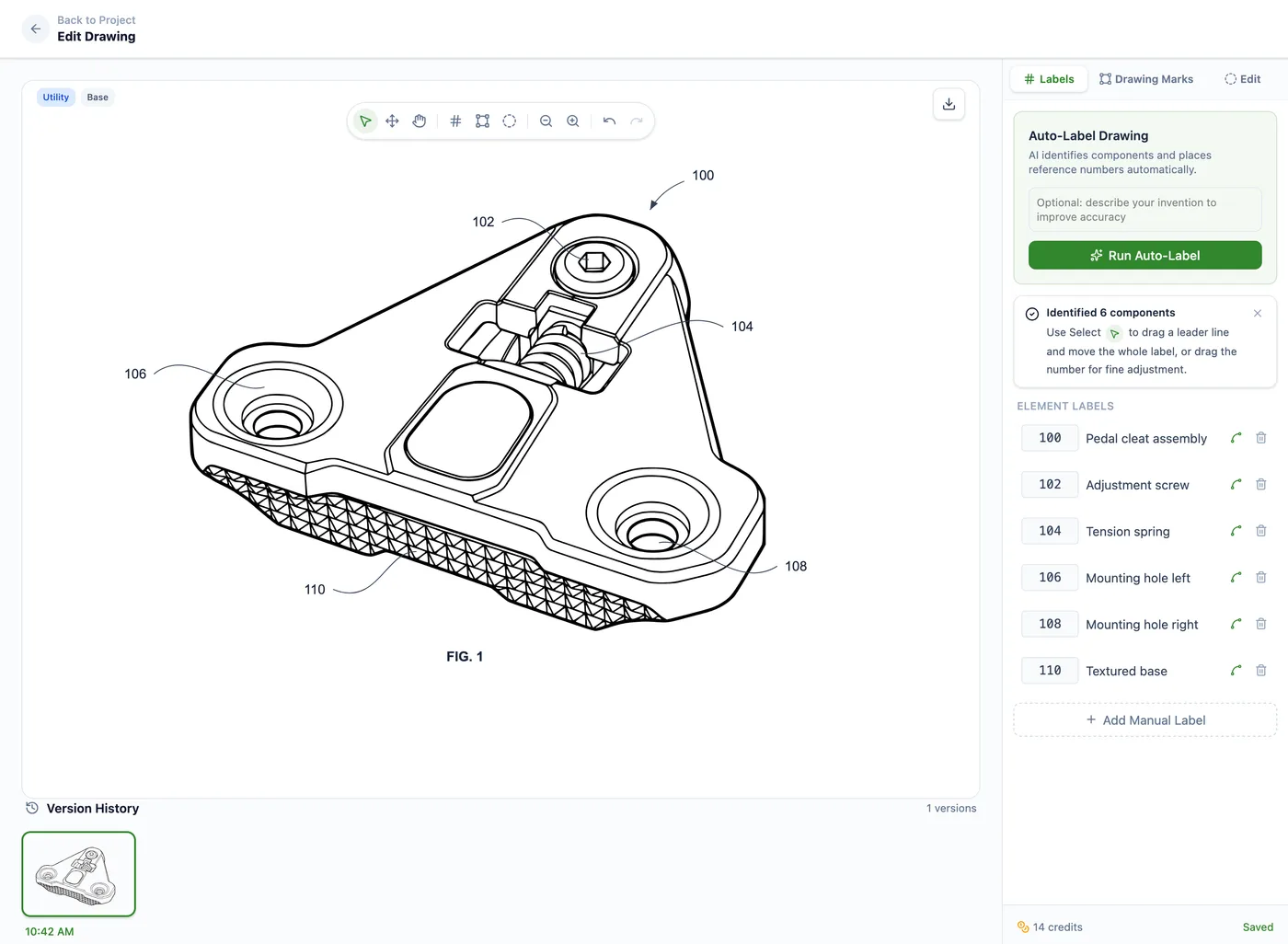
The split is simple. Use ChatGPT to think through the figure. Use PatentDrawingAI to create, label, assemble, and export the set for filing review.
Frequently Asked Questions
Not as a complete workflow. ChatGPT can generate an image that looks like a figure, but a filing-ready set needs vector line art, reference numerals that match your description, formal sheet assembly, export files, and practitioner review. It is a sketchpad for the figure, not the drawing set.
Planning. It can turn a rough invention description into a figure list, explain terms like reference numerals and leader lines, suggest which components to label, prepare inventor-interview questions, and rough out a concept image. Treat all of that as thinking, not the final drawings.
Because a patent figure is a regulated artifact under 37 CFR 1.84: black-and-white line art, reference characters at least 3.2 mm tall, components consistent across views, and formal sheets with margins and numbering. ChatGPT outputs images, cannot reliably tie numerals to your spec, and does not assemble sheets. The USPTO does not impose a special ban on AI-assisted drawing preparation, but the raw output still has to meet the drawing standard.
Be careful. OpenAI says content from ChatGPT Free, Plus, and Pro may be used to improve models unless you opt out in data controls, while ChatGPT Business, Enterprise, Edu, and API data are not used for training by default. Separately, a public disclosure of an unfiled invention can become prior art under 35 U.S.C. 102, and Europe generally applies a stricter novelty rule. Prefer a tool that keeps files private and does not train on them, and talk to your patent attorney about disclosure.
It can put numbers on an image, but not dependably the right numerals in the right places, tied to your description and consistent across figures, as editable labels. That placement is a spatial task where models drift. PatentDrawingAI's Auto-Label is built for it: it detects components and places numbered labels with leader lines you can adjust.
A tool built for the figure layer. PatentDrawingAI turns a sketch, photo, screenshot, slide diagram, or CAD render supplied as an image into filing-ready patent drawings in about one to three minutes per figure, for utility and design patents, with editing, Auto-Label, formal-sheet assembly to 37 CFR 1.84, and PDF/PNG/SVG export, kept private and not used to train models.
Sources
- 37 CFR 1.84 - Standards for drawings
- USPTO patents information
- PatentDrawingAI product page
- ChatGPT overview
- OpenAI image generation announcement
- OpenAI image generation guide
- OpenAI data controls FAQ
- OpenAI data use for model improvement
- OpenAI Enterprise privacy
- OpenAI privacy policy
- USPTO guidance on AI tools
- USPTO MPEP 608.02 - Drawing
- 35 U.S.C. 102 - Conditions for patentability; novelty
- European Patent Convention Article 54 - Novelty
Create Filing-Ready Patent Drawings
Upload a clear source image, generate a patent drawing, add reference numerals, assemble formal sheets, and export PDF, PNG, or SVG in one workflow.
See What We'll Draw