In This Guide
Overview
If you're asking whether Legora does patent drawings, the answer is no. Legora is a legal AI workspace built for research, review, drafting, and collaboration. It doesn't generate the figures that go on your drawing sheets. There's no Legora feature that turns an invention into line art, places reference numerals, lays out formal sheets, and exports a drawing set.
That matters because a patent matter splits into different kinds of work. Legora's strengths sit on the document side: prior art, office actions, claim analysis, internal review. The figures are a separate job, formatted line art under a drawing standard. Legora can sit in the legal AI layer of your stack, but the drawing step needs its own tool. For the full stack, see the AI tools for patent attorneys guide.
If you want to test any workspace for the figure step, judge it by output. Can it start from a source image, produce patent line art, place reference numerals and leader lines, arrange figures on formal sheets, and export PDF, PNG, or SVG files your team reviews before filing? Legora does none of those, and as of 2026 it doesn't market a drawing feature. That's the gap this page is about.
What Legora covers for legal teams
Legora is one of the fastest-growing names in legal AI. Formerly Leya and based in Stockholm, public reporting in 2026 put Legora at about a $5.6 billion valuation after a $600 million Series D, and Business Insider reported that it had passed $100 million in annual recurring revenue. Legora's own customer materials list large-firm users including Goodwin.
The product surface is broad: legal research with citation-backed answers, Tabular Review (which turns a large document set into a structured grid), an Agent and Workflows for multi-step tasks, and an Editor with Word and Outlook add-ins for drafting. Its core practice lanes are M&A, litigation, banking, and tax, and it's edging into IP, where practitioners already use it to identify claim amendments.
All of that is research, review, and drafting. It helps patent teams with the document-heavy parts of a matter: reading prior art, comparing references, reviewing office actions, drafting and summarizing. None of it produces the formal figures that go on drawing sheets. That's a different job, and the next sections explain why.
| Public Legora area | What it's for | Figure gap |
|---|---|---|
| Legal Research | Citation-backed answers from trusted legal sources | Finds law, not figures |
| Tabular Review | Extracts and compares insights across large document sets | Reads documents; doesn't draw them |
| Workflows & Agent | Runs multi-step legal tasks across documents and tools | No source-image intake or reference numerals |
| Editor & Word Add-In | Drafting, redlining, and collaboration on legal text | Produces text, not 37 CFR 1.84 sheets |
| Portal | Client collaboration, shared files, and permissions | Sharing isn't figure production |
Where Legora can fit in patent work
Legora fits the reading and document side of patent work. A patent team can use it to organize research, analyze long documents, draft internal summaries, compare provisions, review prior-art materials, and coordinate work across a firm and client team. That value is real. It just isn't a drawing set.
In a patent application, the text and the drawings have to support each other. The claims and specification explain the invention in words; the figures show it. A platform that helps you research, review, and draft can still leave you without clean figures, reference numerals, leader lines, formal sheet layout, and export files.
This is why Legora sits in the same planning conversation as Harvey, but not in the same slot as a focused drawing tool. The Harvey patent drawings guide reaches the same conclusion for the other big legal AI platform: strong for legal work, not a drawing workflow.
Why patent drawings are a different workflow
A patent drawing isn't a legal document with a picture attached. Under 37 CFR 1.84, drawings have rules for black-and-white line work, color and photographs, sheet size, margins, views, scale, line quality, shading, reference characters, lead lines, sheet numbering, and figure numbering.
That rule set makes the figure step a production workflow. The team needs source images or views, clean line art, labels, reference numerals, leader lines, margins, sheet numbering, FIG. labels, and export files. A legal AI workspace helps with the document layer, but it doesn't create a drawing system that handles those spatial and formatting details.
This is also why the honest wording is "drawings formatted to meet 37 CFR 1.84," not a promise that any drawing will be accepted in every filing. The USPTO reviews drawings on its own terms, and a practitioner still checks the set before it goes out. The product question is whether a workflow hands you a filing-ready set to review. For the formal rules themselves, see the patent drawing rules and guidelines guide.
What to ask before treating Legora as the drawing layer
Run an output checklist before you put any legal AI workspace in the figure layer. The question isn't whether Legora is good legal AI. It's whether the workflow can produce the actual drawing artifacts a filing needs.
Drawing-layer checklist
- Can the workflow accept sketches, product photos, screenshots, slide diagrams, or CAD renders exported as PNG, JPG, or WebP images?
- Can it generate clean patent line art from those source images?
- Can it place and adjust reference numerals, numbered reference labels, and leader lines tied to visible components?
- Can it assemble drawings onto formal sheets with margins, sheet numbering, figure labels, and layout controls around 37 CFR 1.84?
- Can it export a complete drawing set as PDF, PNG, and SVG?
- Can a firm organize repeat drawing work by client, matter, docket number, responsible attorney, and drawing type?
If those answers aren't there, keep Legora in the legal workspace layer and use a purpose-built tool for the figures. For a buyer comparison of those tools, see the best patent drawing software guide.
How PatentDrawingAI fills the drawing layer
PatentDrawingAI is built for exactly the figure layer a legal AI workspace leaves open. Upload a sketch, product photo, screenshot, slide diagram, or CAD render exported as an image, and it generates a filing-ready patent drawing in about one to three minutes per figure. From there you refine with plain-English instructions like "add more thread detail to the screw," "remove the extra side extrusion," or "lighten the top surface."
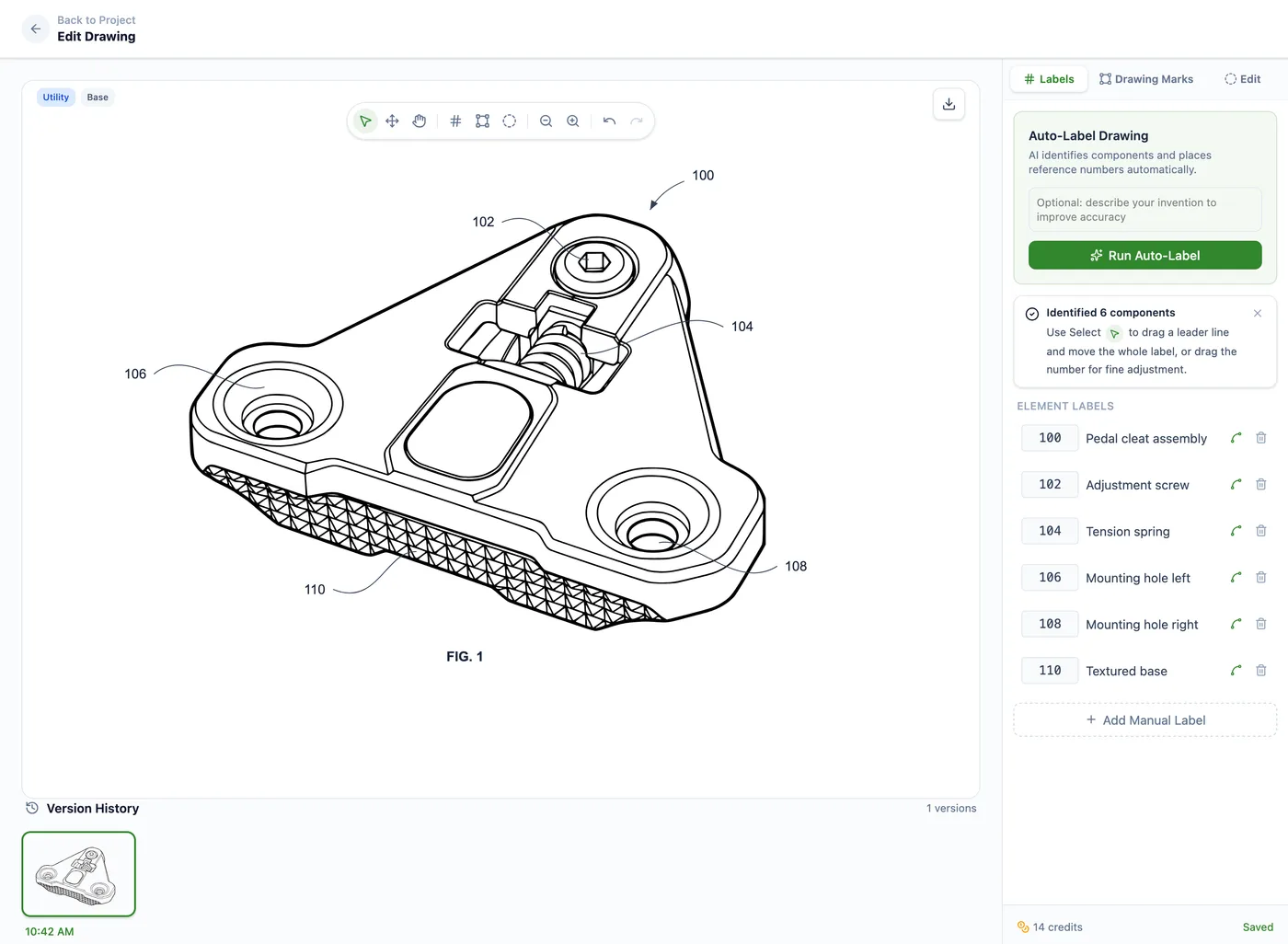
The work stays in one place after generation. Auto-Label places reference numerals and leader lines. Manual annotation handles labels, shapes, hatching, and whiteout regions. Drawing Set assembly arranges figures on formal sheets with margins, sheet numbering, and figure labels formatted to meet 37 CFR 1.84. You export the set as PDF, PNG, or SVG, with DXF linework for CAD workflows where supported. It covers both utility and design drawings.
For firms, Matter Management organizes the drawing work by client, matter, docket or matter number, responsible attorney, and drawing type, with CSV matter import and usage export for billing or internal review. It isn't a full docketing or billing system, and doesn't try to be. It's the matter-aware workflow around the figures. Files stay private by default with encrypted storage, and PatentDrawingAI doesn't train AI models on customer uploads or generated drawings. Pricing is public, from $19 per month, at roughly $2 to $4 per drawing. PatentDrawingAI isn't a law firm and gives no legal advice; it produces and formats the drawings, and the filing decisions stay with you.
PatentDrawingAI drawing editor
Using Legora and PatentDrawingAI together
Legora and PatentDrawingAI solve different layers, so they sit side by side instead of competing. Use Legora for the text-heavy legal work: research, review, drafting. Bring in PatentDrawingAI when the matter needs figures that require line art, reference numerals, formal sheets, and export. One works in language, the other in line art.
Bring the drawing workflow in before final filing review, once the team knows which figures the matter needs. That heads off the usual bottleneck, where the legal work is moving but the figures are still a manual task. Plan the figure step up front, and it stops being a deadline scramble.
If you're mapping a full patent AI stack, use the AI tools for patent attorneys guide as the hub. To compare broad legal AI workspaces on the same figure question, pair this with the Harvey patent drawings guide. And if the question is whether a general AI assistant can create patent figures, see the ChatGPT patent drawings guide.
Frequently Asked Questions
No. Legora's output is legal AI work: research, Tabular Review, drafting, document workflows, agents, and collaboration. It doesn't create patent figures, place reference numerals, assemble formal sheets, or export a drawing set. For figures you need a dedicated drawing tool like PatentDrawingAI, or a draftsperson.
Yes, on the document side. Patent work is full of document-heavy tasks: prior-art analysis, office-action review, research, document comparison, drafting support, internal review. Those are exactly what a legal AI workspace is for. Figure production is the separate piece Legora doesn't cover.
No. Formatting a drawing to 37 CFR 1.84 means handling sheet size, margins, line quality, reference characters, lead lines, figure labels, sheet numbering, and export, which is an illustration task, not a text task. Legora doesn't produce that kind of file. PatentDrawingAI assembles drawings formatted to meet those requirements, and you review the set before filing.
Legora is a broad legal AI workspace for research, review, and drafting. A patent drawing tool is narrow: it turns source images into patent figures, labels them with reference numerals and leader lines, assembles formal sheets, and exports the drawing set for filing review. Different jobs, different tools.
Yes. Legora covers research, review, and drafting, but not figures, so the drawing step stays open. Firms pair Legora with a dedicated drawing tool like PatentDrawingAI, or send figures to a draftsperson.
Yes, and that's the normal setup. Legora sits in the legal AI workspace layer; PatentDrawingAI handles the figure layer. Use Legora for the research, review, and drafting, and PatentDrawingAI when the matter needs filing-ready drawings, reference numerals, formal sheets, and export.
Sources
- 37 CFR 1.84 - Standards for drawings
- USPTO patents information
- PatentDrawingAI product page
- Legora official site
- Legora about page
- Legora customers
- Legora Legal Research
- Legora Tabular Review
- Legora Workflows
- Legora Agent
- Legora Editor
- Legora privacy policy
- Business Insider Legora ARR reporting
- The Australian Legora Series D reporting
Create Filing-Ready Patent Drawings
Upload a clear source image, generate a patent drawing, add reference numerals, assemble formal sheets, and export PDF, PNG, or SVG in one workflow.
See What We'll Draw