In This Guide
Overview
Can Nano Banana make patent drawings? It can make a remarkably convincing image of one. It cannot make one you can file. Google introduced Gemini 2.5 Flash Image, also called nano-banana, and public reporting on Nano Banana Pro describes newer Gemini image capabilities with stronger text rendering, editing, and high-resolution output. That helps it produce a figure that looks like it came off a drawing sheet, callouts and all. What it does not produce is a filing-ready drawing set: clean black line art, reference numerals that match your written description, figures assembled on formal sheets, and export files a practitioner reviews before filing.
The USPTO does not impose a special ban on AI-assisted drawing preparation in the sources reviewed. Its AI-tools guidance treats AI as a tool subject to existing duties, and a patent drawing still has to satisfy 37 CFR 1.84. So the question is not whether Nano Banana figures are allowed. It is whether the raw output clears the standard, and whether the cleanup to get it there costs more than using a tool built for the job.
That puts Nano Banana in the general image-tool layer of a patent AI stack: strong for visualizing an idea, not for producing the drawing set. The test for any tool is the output. Can it turn your source material into black line art, place reference numerals tied to the description, assemble formal sheets, and export a complete set? If it stops at a high-resolution picture, the drawing step is still open. For the broader stack, see the AI tools for patent attorneys guide.
What Nano Banana can do with patent figures
Give Nano Banana its due first. It is the image-generation and editing model behind Gemini's Nano Banana branding. Google describes Gemini 2.5 Flash Image as supporting image generation, multi-turn editing, local edits, and design blending while preserving important visual details. Public reporting on Nano Banana Pro describes better text rendering, 2K and 4K output, and more precise image editing.
For patent figures, that makes it a strong visualization tool. You can rough out what a figure might show, generate alternative views to discuss with a co-inventor, or turn a description into a picture that moves a conversation along. Treat that as planning. A picture that looks like a patent figure helps you think; it is not the figure you file.
"Looks like a patent drawing" vs. "one you can file"
Here is the distinction that matters, and it is sharper with Nano Banana than with weaker image tools precisely because the output looks so good. A patent-styled image and a filing-ready drawing are different things. Under 37 CFR 1.84, a figure has to use black-and-white line work, sit within required sheet sizes and margins, use consistent views and scale, carry reference characters at least 3.2 mm (1/8 inch) tall, and number both the sheets and the figures.
A convincing image clears the looks-like bar and stops there. It still has to depict your actual invention, not a plausible-looking one. It has to keep each component consistent across every view. The numbered callouts have to be the right reference numerals, tied to your written description, not decorative numbers the model placed for effect. And the figures have to sit on formal sheets you can export and review. "Looks like a patent drawing" and "is one you can file" are different claims, and the gap between them is exactly the work a drawing tool does.
The raster-to-vector and cleanup gap
There is a concrete production gap underneath the styling. Nano Banana gives you an image file, not a vector drawing set. Ask for "vector style" and the result can look vector-ish while still needing the cleanup and export work a filing workflow requires. Patent figures need crisp black line art, so a Nano Banana figure usually has to be cleaned, normalized, and traced to vector after the fact when vector output is part of the workflow.
On top of that, generated images can carry gray shading, soft edges, speckle, and a tinted background rather than the solid black-on-white line work 37 CFR 1.84 expects for ordinary line drawings. So each figure also needs the background removed and the art normalized to clean bilevel line work. That is tedious for one figure and a real workflow problem across a ten-figure application, or across the many applications a practitioner handles.
This is why the honest claim for any tool is "formatted to meet 37 CFR 1.84," not a promise of acceptance. The practitioner still reviews the set. For the rules themselves, see the patent drawing rules and guidelines guide.
Confidentiality and data controls
Confidentiality deserves a hard look, because personal Gemini use and an enterprise workflow are not the same. For personal Gemini accounts, Google's Gemini Apps Privacy Hub says Gemini Apps activity may be used to provide, improve, and develop Google products, services, and machine-learning technologies unless your settings say otherwise. Google Cloud's generative AI data-governance docs describe a different enterprise route for Vertex AI, where customer data is not used to train foundation models. Before you paste unfiled invention details in, check which account you are on, your activity settings, your organization's terms, and your firm's policy.
Why it matters: unfiled invention material is sensitive, and public disclosure can count against you. 35 U.S.C. 102 addresses novelty and prior art in the United States, including disclosures before the effective filing date, subject to statutory details and exceptions. Under European Patent Convention Article 54, the state of the art includes what was made available to the public before the filing or priority date. This is not legal advice, and your patent attorney is the right person to weigh it. It is a reason to treat data controls as part of the tool decision.
PatentDrawingAI is built for the opposite default. It does not use customer uploads, prompts, or generated drawings to train AI models, it does not claim rights to your work, and files are private by default with encrypted storage and signed access. With a consumer image tool, those are things you have to check in the terms yourself.
How PatentDrawingAI fills the drawing layer
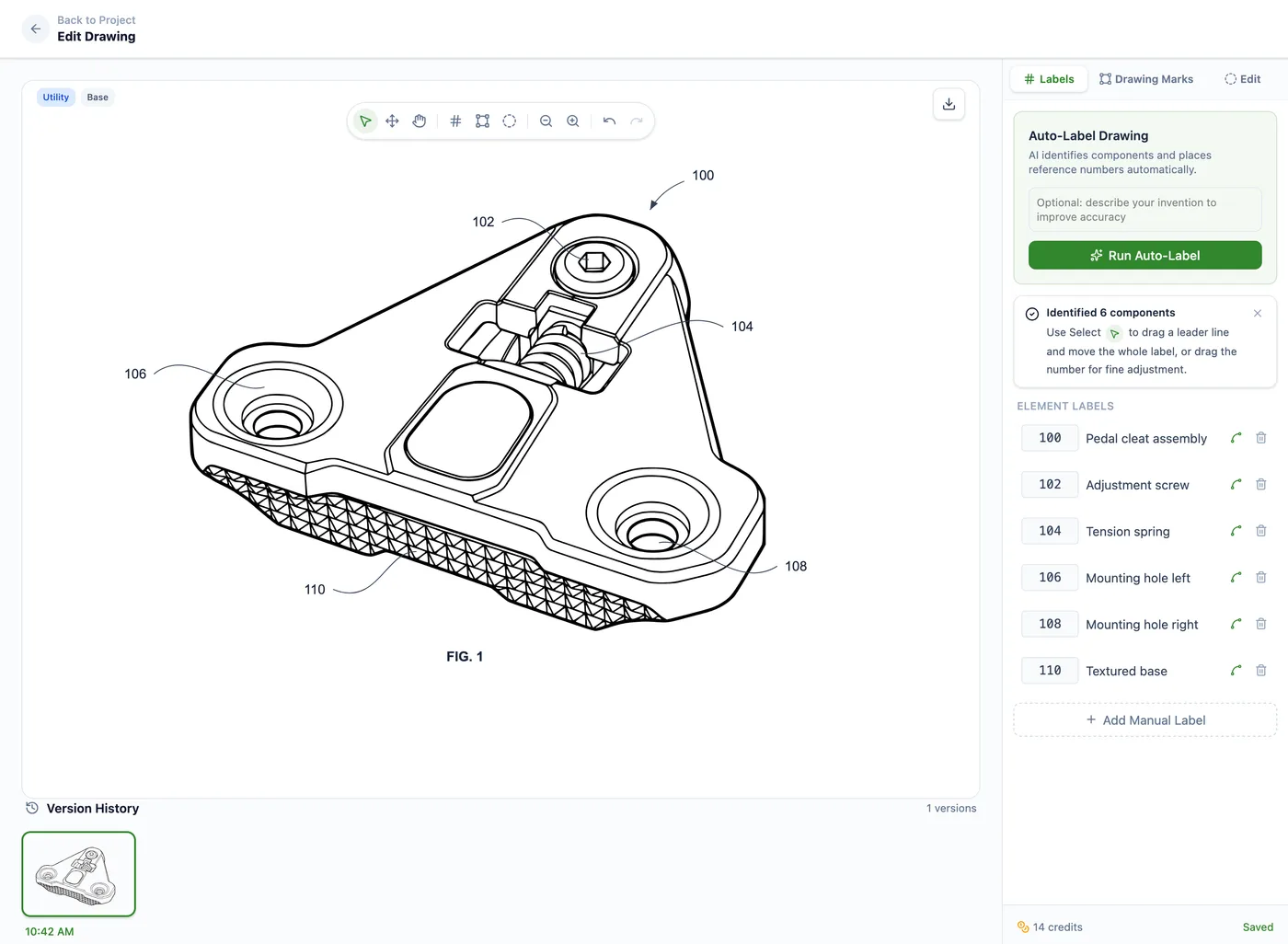
PatentDrawingAI is built for the part Nano Banana does not finish: the drawing set. Upload a sketch, product photo, screenshot, slide diagram, or CAD render exported as a PNG, JPG, or WebP image, and it generates a filing-ready patent drawing in about one to three minutes per figure, then keeps it editable in the same workflow.
The difference is what happens after generation. PatentDrawingAI runs deterministic post-processing: it removes the background, cleans the image up to crisp black line art, and converts it to vector, the cleanup Nano Banana leaves to you. From there you refine with plain-English edits, run Auto-Label to place numbered reference labels with leader lines, and use Drawing Set assembly to lay figures onto formal sheets with margins, sheet numbering, and figure labels formatted to meet 37 CFR 1.84. Export comes out as PDF, PNG, or SVG, with DXF linework for CAD workflows where supported. It covers both utility and design drawings.
For firms, Matter Management organizes the work by client, matter, docket or matter number, responsible attorney, and drawing type, with CSV import and usage export for billing. Files stay private and are not used to train models, and pricing is public, from $19 per month at roughly $2 to $4 per drawing. PatentDrawingAI is not a law firm and gives no legal advice; it produces and formats the drawings, and the filing decisions stay with you. For a wider buyer view, compare the best patent drawing software guide.
PatentDrawingAI drawing editor
Using Nano Banana and PatentDrawingAI together
Nano Banana and PatentDrawingAI fit different steps, so they work in sequence rather than competing. Use Nano Banana early, when you want to visualize a concept or talk an idea through. Bring in PatentDrawingAI when the matter needs figures that have to be cleaned to vector line art, labeled with reference numerals, assembled on formal sheets, and exported for filing review.
If you're mapping a full patent AI stack, use the AI tools for patent attorneys guide as the hub. For the same question applied to a general chatbot, see the ChatGPT patent drawings guide, and for the big legal AI workspaces, the Harvey patent drawings guide and Legora patent drawings guide reach the same conclusion: useful upstream, but the drawing layer needs a tool built for it.
Frequently Asked Questions
It can generate a convincing patent-styled image, but not a filing-ready drawing set. Nano Banana, Google's Gemini image model, outputs image files, does not tie callouts to your written description, and does not assemble formal sheets. You still need to clean, label, and assemble the figures before filing review.
Nano Banana Pro can produce impressive patent-styled output, but looking like a patent drawing is not the same as meeting 37 CFR 1.84. The figure still has to be clean black line art, depict your actual invention consistently across views, carry correct reference numerals, and sit on formal sheets. That is a separate production step.
Three reasons. It is an image file, not a formal drawing-set export. It can carry gray shading or a tinted background that has to be cleaned to black-on-white line art. And its callouts are not reference numerals tied to your specification or assembled onto numbered sheets. The USPTO does not impose a special ban on AI-assisted drawing preparation, but the raw output still has to meet the drawing standard.
Be careful. For personal Gemini accounts, Google says Gemini Apps Activity may be used to improve Google products, services, and machine-learning technologies unless your settings say otherwise; enterprise and Workspace terms can differ. Separately, a public disclosure of an unfiled invention can become prior art under 35 U.S.C. 102, and Europe generally applies a stricter novelty rule. Prefer a tool that keeps files private and does not train on them, and talk to your patent attorney about disclosure.
Nano Banana is a general image model: useful for a quick concept, but it gives you an image you still have to clean, label, and assemble. PatentDrawingAI is purpose-built for the figure layer: it handles cleanup and vector preparation, places reference numerals with Auto-Label, assembles formal sheets to 37 CFR 1.84, exports PDF/PNG/SVG, and keeps files private without training on them.
A tool built for the figure layer. PatentDrawingAI turns a sketch, photo, screenshot, slide diagram, or CAD render supplied as an image into filing-ready patent drawings in about one to three minutes per figure, for utility and design patents, with cleanup, Auto-Label, formal-sheet assembly, and export, kept private and not used to train models.
Sources
- 37 CFR 1.84 - Standards for drawings
- USPTO patents information
- PatentDrawingAI product page
- Google Developers Blog - Gemini 2.5 Flash Image
- The Verge Nano Banana Pro reporting
- Google Gemini Apps Privacy Hub
- Google Cloud Vertex AI generative AI data governance
- USPTO guidance on AI tools
- USPTO MPEP 608.02 - Drawing
- 35 U.S.C. 102 - Conditions for patentability; novelty
- European Patent Convention Article 54 - Novelty
Create Filing-Ready Patent Drawings
Upload a clear source image, generate a patent drawing, add reference numerals, assemble formal sheets, and export PDF, PNG, or SVG in one workflow.
See What We'll Draw