The 30-Second Answer
PatentDrawingAI is the right pick if drawings are your primary need and you value price, speed, and self-serve control. $19 per month gets you 25 credits, about 5 new drawings, with no demo, no setup, and no enterprise onboarding. Generation runs in 1-3 minutes per figure, Auto-Label places numbered reference labels for you, and the output is filing-ready PDF, PNG, or SVG.
For law firms, Matter Management organizes drawing projects by client, matter, docket number, and responsible attorney, with CSV import and usage export. It is useful for provisional filings, design patents, utility patents, and rapid iteration.
Solve Intelligence is the right pick if you need a full AI patent platform where drawings sit alongside drafting, prosecution, claim charts, and other patent workflow tools. Pricing is custom; demos are required.
Bottom line: if you need a complete platform, Solve is built for that. If you need filing-ready patent drawings without an enterprise contract, PatentDrawingAI produces the finished drawing set.
Tool vs Platform: The Core Difference
Both products use AI for patent work, but they overlap only around figures. Understanding which model fits your workflow is most of the decision.
What Solve Intelligence is
- An AI patent platform used by 500+ IP teams across six continents
- Covers invention harvesting, patent application drafting, prosecution and office-action responses, and claim charts
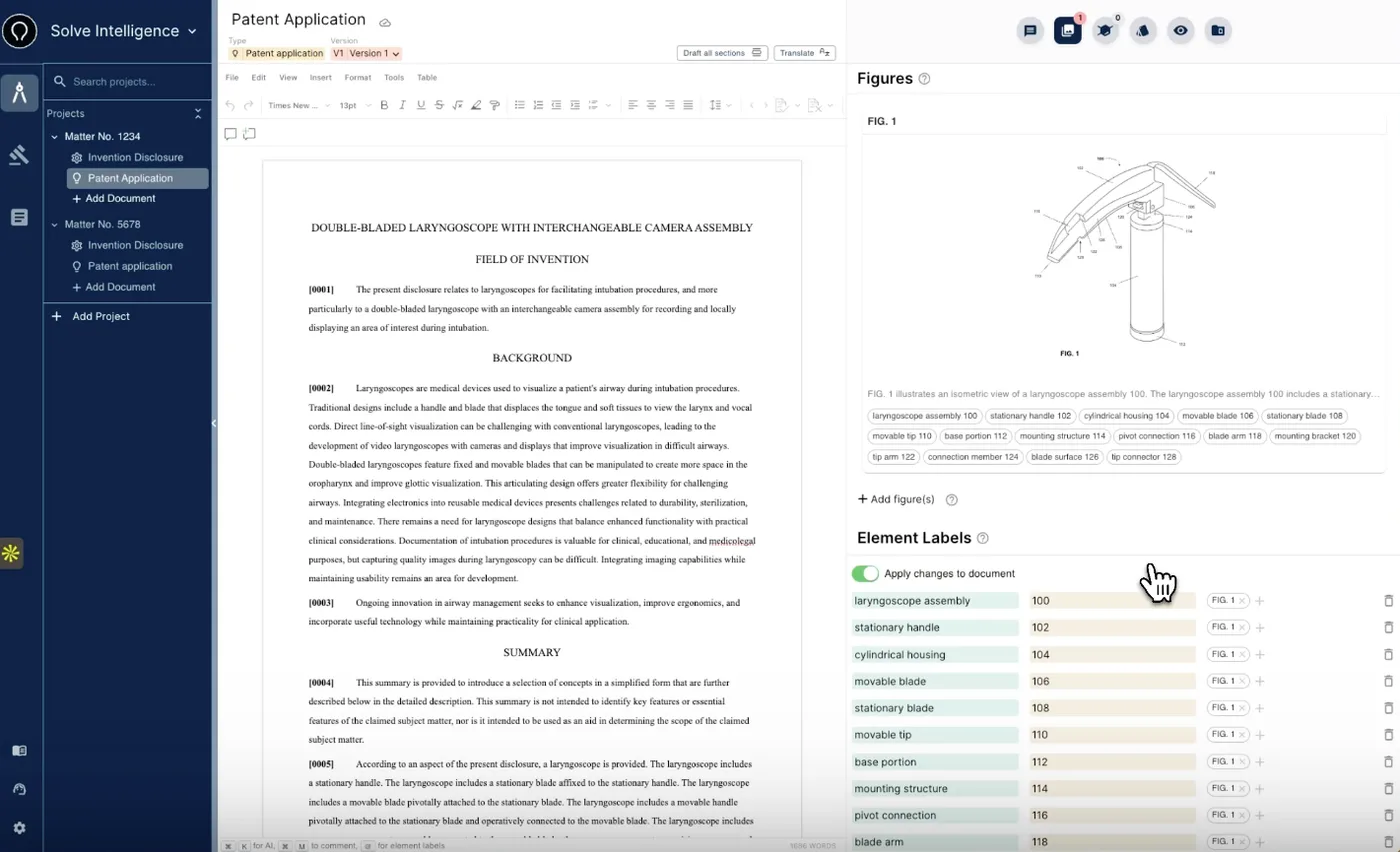
- Generates, analyzes, and edits figures, chemical structures, and biological sequences as part of the drafting workflow
- Sold via demo and custom contract, with Microsoft Word-oriented drafting workflows
- According to Solve's December 2025 funding announcement, backed by Microsoft (M12), Thomson Reuters Ventures, Y Combinator, 20VC, and Visionaries, with total funding of $55M as of December 2025
What PatentDrawingAI is
- A self-serve web app that turns a sketch, photo, or CAD render into a filing-ready, USPTO-formatted patent drawing in 1-3 minutes per figure
- Image-to-image AI for both utility and design patent drawings
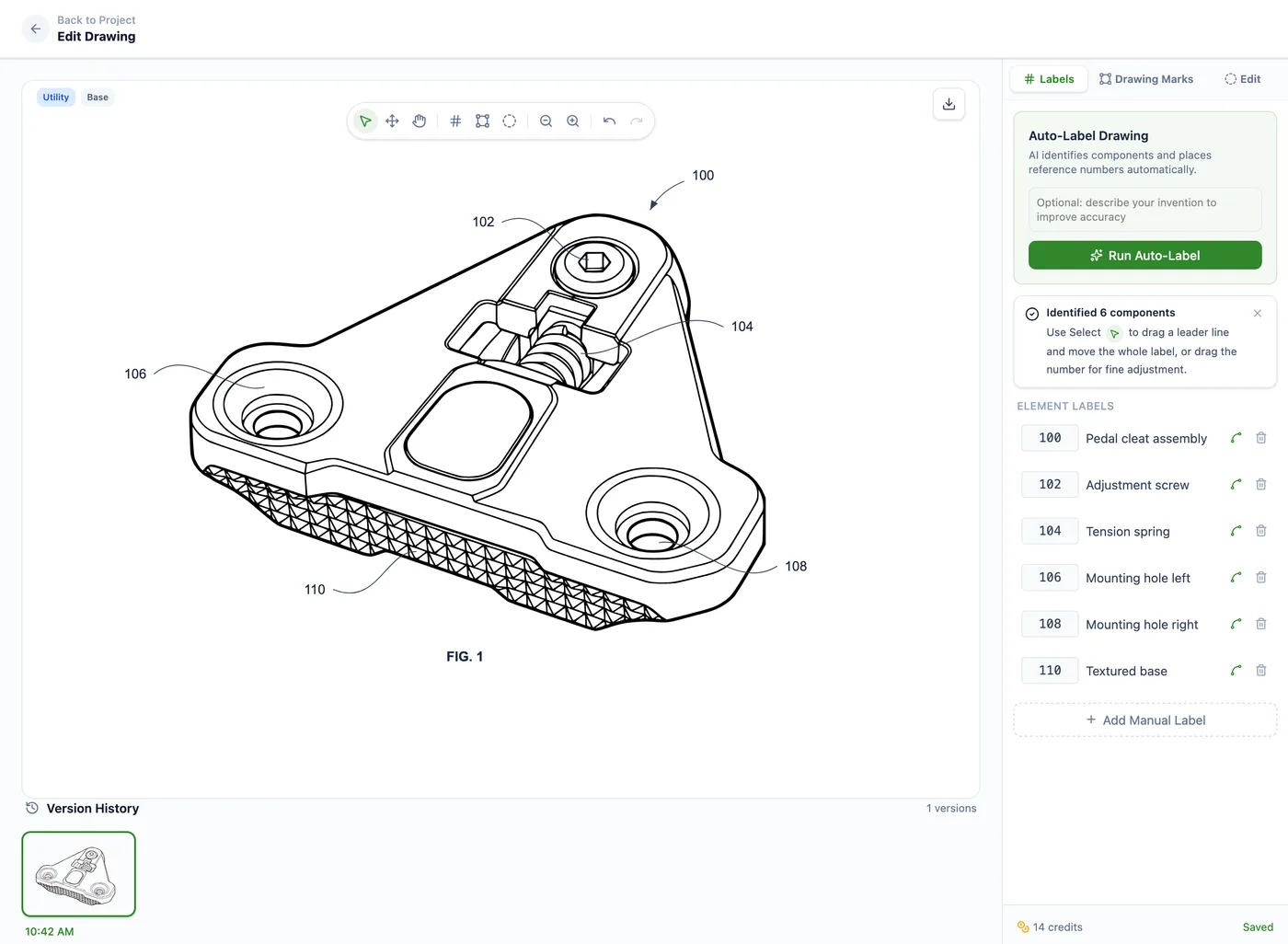
- Auto-Label detects components and places numbered reference labels and leader lines automatically
- Plain-English editing: type instructions like "thicken the lead lines" or "remove background shading" and the AI regenerates the figure
- Manual annotation tools for reference numbers, leader lines, text and section labels, shapes, hatching, and whiteout regions
- Drawing Set assembly with pre-configured USPTO sheets formatted to 37 CFR 1.84, including sight-area checks and reference-number conflict detection
- Matter Management for firms: client, matter, docket number, responsible attorney, drawing type, CSV matter import, and usage export
- Filing-ready PDF, PNG, and SVG export, with DXF for CAD workflows where supported
- Self-serve pricing from $19 to $399 per month with free upload and analysis. No demo, no setup, and no enterprise onboarding
- Does not draft claims, write specifications, or file the application for you
Solve Intelligence figure workflow
PatentDrawingAI drawing editor
Bottom line
If you need a complete AI patent platform with integrated drafting and prosecution, Solve Intelligence is purpose-built for that. If you need filing-ready patent drawings without an enterprise commitment, PatentDrawingAI produces the finished drawing set in one tool.
Side-by-Side Overview
PatentDrawingAI
about $2-$4 per new AI drawing
- Category: focused, self-serve AI patent drawing tool
- Pricing model: published tiers, self-serve checkout, free upload and analysis, one-time top-ups
- Turnaround: 1-3 minutes per figure
- Buy flow: sign up, no sales call
- Input: images (PNG, JPG, WebP): sketches, presentation-slide screenshots, product photos, CAD renders
- Output: filing-ready drawing sets (PDF, PNG, SVG), plus DXF for CAD workflows where supported
- Scope: AI generation, Auto-Label, annotation, sheet assembly, matter organization, export
- Best for: inventors and patent attorneys filing 3+ patents per year; small and mid-size firms
Solve Intelligence
pricing not publicly disclosed
- Category: full AI patent platform
- Pricing model: custom, demo required, no public pricing
- Turnaround: not publicly published
- Buy flow: sales demo, implementation, training
- Input: text, images, chemical structures, biological sequences
- Output: integrated patent work product across drafting, prosecution, charts, and figures
- Scope: invention harvesting, drafting, prosecution, claim charts, figures
- Best for: law firms and in-house IP teams managing high patent volume
Solve details are based on public materials available at the time of publication. Contact Solve for the latest supported inputs, implementation scope, and pricing.
Feature Comparison
Side-by-side across the dimensions that matter when you are choosing between a focused drawing tool and a full enterprise patent platform.
Solve feature descriptions are based on public materials available at the time of publication. Contact Solve for the latest product scope, supported inputs, and implementation details.
| Capability | PatentDrawingAI | Solve Intelligence | Verdict |
|---|---|---|---|
| Patent drawing generation | Core feature: image-to-image AI for utility and design patents | Generates and edits figures as part of a broader drafting workflow | Different focus |
| Input types for drawings | Images (PNG, JPG, WebP): sketches, presentation-slide screenshots, product photos, CAD renders | Text, images, chemical structures, and biological sequences per public product materials | Solve Intelligence (broader) |
| Drawing turnaround | 1-3 minutes per figure | Not publicly published; integrated into the drafting workflow | PatentDrawingAI (transparent) |
| Auto-Label | AI detects components and places numbered reference labels and leader lines; included free | Not publicly documented as a discrete drawing-workflow feature | PatentDrawingAI |
| Plain-English editing | Freeform instructions; AI regenerates the figure for 1 credit per edit | Available within the platform | Comparable |
| Region-specific editing | Users can mark or circle an area of a drawing and describe the targeted change | Not publicly documented as a discrete drawing-editing feature | PatentDrawingAI |
| Manual annotation suite | Reference numbers, leader lines, text and section labels, shapes, hatching, and whiteout; included free | Available within the platform | Comparable |
| USPTO sheet assembly | Pre-configured 37 CFR 1.84 sheets, up to 4 figures per page, sight-area checks, and reused-reference-number detection | Available within the broader drafting platform | Comparable; PatentDrawingAI is focused |
| Patent drafting tools | None; drawing generation only | Full suite for drafting, prosecution, invention harvesting, and claim charts | Solve Intelligence |
| Figure sync with specification | Standalone filing-ready files for use alongside other workflows | Figures live inside the drafting workflow | Solve Intelligence (if you need integration) |
| Matter Management for firms | Client, matter, docket, attorney, and drawing-type organization; CSV matter import and usage export | Not publicly documented as a discrete drawing-workflow feature | PatentDrawingAI |
| Pricing model | Transparent: $19-$399/mo, self-serve, free upload and analysis, top-ups available | Custom enterprise pricing; not publicly disclosed | PatentDrawingAI (transparent) |
| Effective cost per drawing | ~$2-$4 per new AI drawing | Not publicly disclosed | PatentDrawingAI (transparent) |
| Effective cost per AI edit | ~$0.40-$0.76 per AI redraw edit | Not publicly disclosed | PatentDrawingAI (transparent) |
| Setup & onboarding | Instant sign-up; no setup and no enterprise onboarding | Sales demo, implementation, and team training | PatentDrawingAI (faster start) |
| Target user | Inventors, patent attorneys, in-house IP teams, and firms of any size that need filing-ready drawing generation | Law firms and in-house IP teams managing high patent volume | Different buyers |
| USPTO formatting | Built-in 37 CFR 1.84 formatting guards on drawing sheets | Supports patent applications and figures inside the broader drafting workflow | Comparable |
| Export formats | Filing-ready PDF, PNG, SVG; DXF for CAD workflows where supported | Integrated drafting and review workflows, including Microsoft Word-oriented workflows | Different workflows |
| Security and privacy | Encrypted storage, private-by-default workflows, and no AI training on customer uploads | Enterprise security certifications and privacy controls described in public security materials | Different procurement posture |
When Solve Intelligence wins
Solve fits if you need a cohesive platform where drawings integrate with specification drafting, prosecution, and claim analysis. A larger law firm with high filing volume can benefit from the unified workflow, and the per-user cost spreads across the team.
When PatentDrawingAI wins
PatentDrawingAI wins if filing-ready drawings are your primary need and you value price, speed, and self-serve control. $19 per month gets you 25 credits, and only AI generation and AI redraw edits consume credits. Labeling with Auto-Label, manual annotation, USPTO sheet assembly, matter organization, and PDF/PNG/SVG export are included.
Upload any supported image (JPG, PNG, or WebP), generate a USPTO-formatted line drawing in 1-3 minutes, run Auto-Label, assemble the sheets, and export. For provisional filings, design patents, utility patents, and rapid iteration, this is a fast path from raw image to filing-ready sheets.
Pricing Comparison
Solve Intelligence
Solve Intelligence does not publish pricing on its website. The product is sold via demo and custom contract. Third-party estimates vary widely depending on plan size and seat count, so any specific number from outside sources should be treated as an estimate. For accurate current pricing, request a quote directly from Solve Intelligence.
PatentDrawingAI: published, all tiers visible
| Plan | Monthly | Credits / mo | ~New drawings | Effective $/drawing |
|---|---|---|---|---|
| Starter | $19 | 25 | ~5 | ~$3.80 |
| Pro | $79 | 125 | ~25 | ~$3.16 |
| Firm | $199 | 400 | ~80 | ~$2.49 |
| Team | $399 | 1,000 | ~200 | ~$2.00 |
One-time top-ups are also available without a subscription change: 20 credits for $20, 55 credits for $50, and 120 credits for $100. Uploading and analyzing your image is free with no credit card, so you can see what it will draw before choosing a plan.
What consumes credits
Only two things consume credits: a new AI drawing generation (5 credits) and an AI redraw edit in plain English (1 credit). That works out to roughly $2-$4 per new drawing and $0.40-$0.76 per AI edit, depending on plan.
What is included
Included features continue to expand, but today the subscription already includes Auto-Label, manual annotation, Drawing Set assembly, USPTO sheet formatting, reference-number conflict detection, Matter Management, and filing-ready PDF/PNG/SVG export.
The pricing story
A human illustrator typically charges per figure and per revision round. With PatentDrawingAI, only the AI work consumes credits; the iterative labeling, annotation, sheet formatting, matter organization, and export are included. For a firm running 10 utility patent figures with three plain-English edits each, the AI cost is roughly $50.56 at Pro pricing: 10 generations plus 30 edits equals 80 credits. A direct cost-per-drawing comparison with Solve Intelligence is not possible because Solve does not publish pricing.
Matter Management for Firms
Matter Management is PatentDrawingAI's optional firm workflow layer. It turns a per-project drawing tool into a drawing workspace organized by client, matter, docket or matter number, responsible attorney, and drawing type.
- Matter directory: create, edit, search, filter, and archive matters. Each matter stores client name, matter name, docket or matter number, responsible attorney, and drawing type.
- CSV matter import: bring an existing matter list from a spreadsheet or matter system. The importer maps CSV columns, previews duplicate and invalid rows, and lets you skip, update, or import duplicates as new matters.
- Project linking: when starting a drawing project, link it to an existing matter or create a new one; project names can prefill from the selected matter.
- Usage export: download CSV usage reports filtered by date range, client, matter, and drawing type, with columns for date, client, matter, docket/matter #, project, drawing ID, action, drawing type, credits, and responsible attorney.
- Historical attribution: usage exports preserve matter attribution from the time credits were spent, so later matter changes do not rewrite old billing or internal-review records.
Included with PatentDrawingAI
Matter Management is included and does not consume credits. It is not a full practice-management, docketing, invoicing, or legal-billing system. It is a drawing-workflow layer for organizing patent drawing projects and exporting drawing usage by matter.
Solve targets law firms and in-house IP teams with a broader patent workflow covering drafting, prosecution, claim charts, and figures. For drawing-specific matter attribution, PatentDrawingAI is focused on connecting each generated figure back to a client, matter, docket number, and responsible attorney.
Who Should Choose What?
Choose Solve Intelligence if:
- You need a full patent platform: drafting, prosecution, claim charts, and figures in one workflow
- You are a patent team with high annual filing volume and want drawings integrated into a broader drafting and prosecution workflow
- You want figures to live inside the same workflow as the written specification
- You have a dedicated IP operations budget and are comfortable with a sales-led buying process
- You work with complex filings where integration across drafting, prosecution, and figures is worth the platform commitment
- Claim drafting and office-action workflows are as important to you as figures
Choose PatentDrawingAI if:
- You primarily need filing-ready USPTO-formatted patent drawings, fast and affordably
- You file patent applications regularly and need a faster, more affordable way to produce filing-ready drawings
- You are a law firm or patent team, from solo practice to a larger firm, that wants client, matter, and docket organization around drawing work
- You prefer to upload images such as sketches, photos, and CAD renders rather than write text descriptions
- You value transparent, published pricing without sales calls or demos
- You want to start instantly with no setup and no enterprise onboarding
- You iterate quickly and need affordable AI edits at 1 credit per regeneration
- Your budget is in the $19-$399/month range
- You handle drafting and claim work separately through attorneys, in-house teams, or external services
The Hybrid Approach
Some teams use both. A large law firm might run Solve Intelligence for end-to-end patent work on major filings, and PatentDrawingAI for rapid provisional filings, design patents, or high-volume utility drawings where speed and per-figure cost matter more than workflow integration.
A solo patent lawyer might use PatentDrawingAI for figures and Matter Management on the Pro plan, with 125 monthly credits, while handling claims, specifications, and filing through traditional drafting templates or separate tools.
The practical reality
A focused drawing tool does not have to replace an enterprise platform to be useful. If it produces filing-ready drawings, handles annotations and sheet assembly, and tracks the work by matter, a broader platform can stay focused on drafting and prosecution where end-to-end integration is worth the cost.
Need Patent Drawings? Start Today.
Upload a sketch, photo, or CAD render. Get a filing-ready USPTO-formatted drawing in 1-3 minutes, edit with plain English, and assemble the sheets in one tool: no setup, no sales call, no credit card to start.
Try It Free — No Credit Card RequiredFrequently Asked Questions
Yes. PatentDrawingAI exports filing-ready PDF, PNG, and SVG files, so the drawings can sit alongside broader drafting platforms and patent workflows. The outputs are standard standalone files, not locked to PatentDrawingAI's environment.
Both tools work with figures, but with different scope. Per Solve Intelligence's public materials, its platform generates, analyzes, and edits figures, chemical structures, and biological sequences as part of a broader drafting workflow. PatentDrawingAI is a focused tool that converts an uploaded sketch, photo, or CAD render into a filing-ready, USPTO-formatted patent drawing in 1-3 minutes per figure, then assembles the figures onto sheets formatted to 37 CFR 1.84. Solve does not publish figure turnaround times.
PatentDrawingAI is built for that use case. Plans start at $19 per month with self-serve checkout and no sales call. Only AI generation and AI redraw edits consume credits; labeling with Auto-Label, manual annotation, USPTO sheet assembly, matter organization, and PDF/PNG/SVG export are included. The drawings are filing-ready standalone files, so if you later add a broader drafting or claim tool, your PatentDrawingAI outputs can still sit alongside that workflow.
It depends on what 'complex' means for your filing. Solve Intelligence's strength is integration: claims, specification drafting, prosecution, claim charts, and figures live in one platform. PatentDrawingAI's output quality depends on the clarity of the input image; it can produce clean drawings from clear source images, whether the invention is simple or intricate. PatentDrawingAI supports both utility and design patent drawings. If you need help drafting claims or the specification, Solve is the broader fit. If you have the specification handled and need filing-ready figures, PatentDrawingAI produces the finished drawing set.
Yes. PatentDrawingAI outputs standard files, so it can sit alongside broader drafting platforms. Use PatentDrawingAI for figure generation, annotation, sheet assembly, and matter-based drawing organization while keeping another platform or service for the rest of the patent workflow.
Yes. PatentDrawingAI includes Matter Management, an optional workflow layer that organizes drawing projects by client, matter, docket or matter number, responsible attorney, and drawing type. Firms can import a matter list from CSV with duplicate-row preview, link drawing projects to existing matters, and export matter-based usage reports for billing or internal review. Matter Management is included; it does not consume credits. It is not a full practice-management or invoicing system; it is a drawing-workflow layer for organizing patent drawing work by matter.
Only for the drawing part of the workflow. Solve Intelligence is a broader AI patent platform for drafting, prosecution, claim charts, and related workflows. PatentDrawingAI is focused on filing-ready patent drawings: generation, editing, Auto-Label, sheet assembly, export, and Matter Management. If you need a full patent platform, Solve may be the broader fit. If you need finished drawing sets that can sit alongside your existing drafting workflow, PatentDrawingAI is purpose-built for that.
Sources for Solve Intelligence claims
- Solve Intelligence homepage and product pages for customer count, product features, and public security positioning.
- Solve Intelligence Series B announcement for funding, six-continent reach, and claim charting launch.
- IPWatchdog Series B coverage for named customer and company context.
- Solve Intelligence article on AI patent drawings and figure labeling for its public figure workflow screenshot and figure generation/labeling discussion.
- TechCrunch Series A coverage for founding and funding context.
Pricing for Solve Intelligence is not publicly disclosed. For current quotes, contact Solve Intelligence directly. Product surfaces and pricing change over time.
Related Comparisons and Resources
- PatentDrawingAI vs DeepIP — focused drawing tool vs enterprise drafting suite
- PatentDrawingAI vs PatentYogi — self-serve tool vs traditional patent services firm
- Best Patent Drawing Software in 2026 — top tools ranked
- Patent Drawing Software Comparison — every major tool side-by-side