The 30-Second Answer
PatentDrawingAI is the right pick if drawings are your primary need and you value price, speed, and self-serve control. $19 per month gets you 25 credits, about 5 new drawings, with no demo, no setup, and no enterprise onboarding. Generation runs in 1-3 minutes per figure, Auto-Label places numbered reference labels for you, and the output is filing-ready PDF, PNG, or SVG.
For law firms, Matter Management organizes drawing projects by client, matter, docket number, and responsible attorney, with CSV import and usage export. Useful for provisional filings, design patents, utility patents, and rapid iteration on image-based source material.
Patently Create is the right pick if you want an AI patent workspace where claim drafting, prior-art search, and figure generation sit together. Patently's current public pricing page lists paid plans as custom pricing. Best for teams writing specifications and claims at volume.
Bottom line: if you need a full drafting workspace, Patently Create is built for that. If you need filing-ready patent drawings without an enterprise commitment, PatentDrawingAI produces the finished drawing set.
Tool vs Workspace: The Core Difference
Both products use AI to help with patents, but they approach the problem from opposite ends. Understanding which model fits your workflow is most of the decision.
What Patently Create is
- A comprehensive AI patent workspace for drafting, search, rating, prosecution, oppositions, and litigation work
- Covers patent search, analysis, claim review and drafting, and figure generation in one workspace
- Figure generation is integrated with text-based drafting: Patently says Onardo can work from claims, pull and group features, and help create editable diagrams
- Web-based with team management, sharing, and collaboration features
- Paid plans are listed as custom pricing on Patently's current public pricing page
What PatentDrawingAI is
- A self-serve web app that turns a sketch, photo, or CAD render into a filing-ready, USPTO-formatted patent drawing in 1-3 minutes per figure
- Image-to-image AI for both utility and design patent drawings
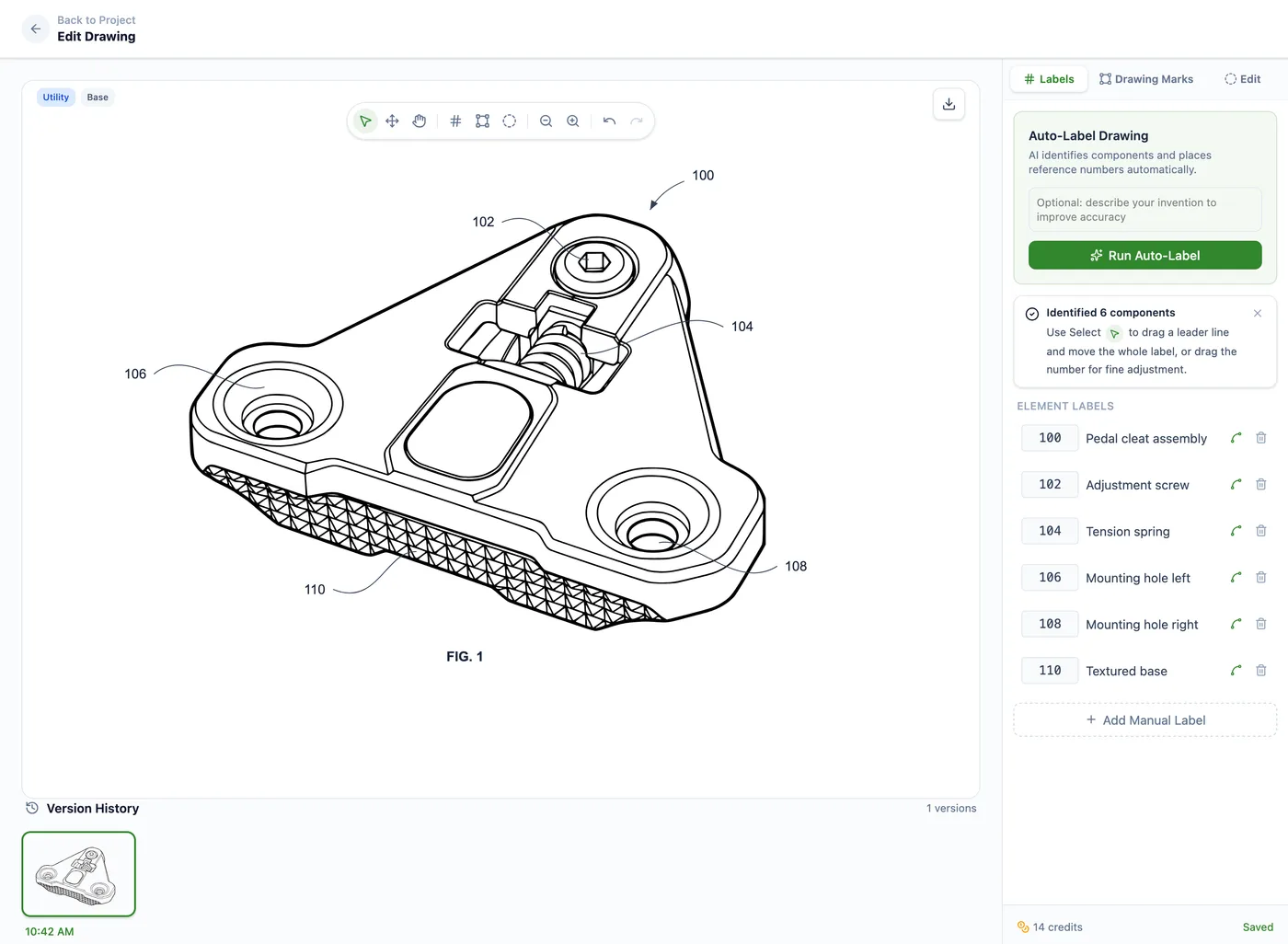
- Auto-Label detects components and places numbered reference labels and leader lines automatically
- Plain-English editing for figures: type instructions like "thicken the lead lines" or "remove background shading" and the AI regenerates the figure
- Region-specific editing: mark or circle an area of a drawing and describe the targeted change in plain English
- Manual annotation tools for reference numbers, leader lines, text and section labels, shapes, hatching, and whiteout regions
- Drawing Set assembly with pre-configured USPTO sheets formatted to 37 CFR 1.84, including sight-area checks and reference-number conflict detection
- Matter Management for firms: client, matter, docket number, responsible attorney, drawing type, CSV matter import, and usage export
- Filing-ready PDF, PNG, and SVG export, with DXF for CAD workflows where supported
- Self-serve pricing from $19 to $399 per month with free upload and analysis, no demo, no setup, and no enterprise onboarding
- Does not draft claims, write specifications, or file the application for you
PatentDrawingAI drawing editor
Different modalities
Patently Create's figure workflow is claim-and-diagram oriented: public materials describe claims, parts lists, editable diagrams, and imported images inside the drafting workspace. PatentDrawingAI is image-to-drawing: you upload a sketch or photo, and AI generates filing-ready line art. These solve different problems.
Bottom line
If you need a complete AI patent workspace with integrated drafting and search, Patently Create is purpose-built for that. If you need filing-ready patent drawings without an enterprise commitment, PatentDrawingAI produces the finished drawing set in one tool.
Side-by-Side Overview
PatentDrawingAI
about $2-$4 per new AI drawing
- Category: focused, self-serve AI patent drawing tool
- Pricing model: published tiers, self-serve checkout, free upload and analysis, one-time top-ups
- Turnaround: 1-3 minutes per figure
- Buy flow: sign up, no sales call
- Input: images (PNG, JPG, WebP): sketches, presentation-slide screenshots, product photos, CAD renders
- Output: filing-ready drawing sets (PDF, PNG, SVG), plus DXF for CAD workflows where supported
- Scope: AI generation, Auto-Label, annotation, sheet assembly, matter organization, export
- Best for: inventors and patent attorneys filing 3+ patents per year; small and mid-size firms
Patently Create
quote-based paid plans
- Category: AI patent workspace
- Pricing model: quote-based paid plans on the current public pricing page
- Turnaround: integrated with drafting; not publicly published
- Buy flow: account setup and team management
- Input: text descriptions and patent claim language; image upload also supported
- Output: workspace-native figures integrated with the specification
- Scope: patent search, claim drafting, specification review, figure generation
- Best for: patent teams, law firms, and corporations doing end-to-end drafting
Patently Create details are based on public materials available at the time of publication. Contact Patently for the latest supported inputs, implementation scope, and pricing.
Feature Comparison
Side-by-side across the dimensions that matter when you are choosing between a focused drawing tool and a full patent workspace.
Patently Create feature descriptions are based on public materials available at the time of publication. Contact Patently for the latest product scope, supported inputs, and implementation details.
| Capability | PatentDrawingAI | Patently Create | Verdict |
|---|---|---|---|
| Drawing generation input | Image-to-image: sketches, photos, presentation slides, CAD renders (PNG, JPG, WebP) | Text descriptions and claim language drive figure generation; image upload is also available | Different modalities |
| Figure turnaround | 1-3 minutes per figure | Integrated with drafting; specific turnaround not publicly published | PatentDrawingAI (transparent) |
| Auto-Label for reference numbers | AI detects components and places numbered reference labels and leader lines automatically; included | Generates figure descriptions and labels from claim text as part of the drafting workflow | Different approach |
| Plain-English editing on figures | Freeform instructions; AI regenerates the figure for 1 credit per redraw | Natural-language editing available across claims, specs, and figures | Comparable |
| Region-specific drawing edits | Mark or circle an area of a drawing and describe the targeted change in plain English | Not publicly documented as a discrete drawing-editing feature | PatentDrawingAI |
| Manual annotation suite | Reference numbers, leader lines, text and section labels, shapes, hatching, and whiteout; included | Editing happens inside the drafting workspace alongside spec text | Different workflows |
| USPTO sheet assembly | Pre-configured 37 CFR 1.84 sheets, up to 4 figures per page, sight-area checks, and reused-reference-number detection | Figures live inside the patent application workflow | PatentDrawingAI (focused) |
| Patent drafting tools | None; drawing generation only | Full suite for AI-assisted claim drafting, specification review, and prior-art search | Patently Create |
| Patent search and analysis | None | Integrated patent search and analysis | Patently Create |
| Claim generation | None | AI-assisted claim drafting from invention disclosures | Patently Create |
| Matter Management for firms | Client, matter, docket, attorney, and drawing-type organization; CSV matter import and usage export | Team workspace, sharing, and permissions across drafting and figures | Different scope |
| Pricing model | Transparent: $19-$399/mo, self-serve, free upload and analysis, top-ups available | Public pricing page lists paid plans as custom pricing; contact Patently for a quote | PatentDrawingAI (published tiers) |
| Setup and onboarding | Instant sign-up; no setup and no enterprise onboarding | Web-based, account setup, and team management | PatentDrawingAI (faster start) |
| Target user | Solo inventors, patent attorneys, in-house IP teams, and firms that need filing-ready drawing generation | Patent teams, law firms, and corporations doing end-to-end drafting and figure generation | Different buyers |
| Output formats | Filing-ready PDF, PNG, SVG; DXF for CAD workflows where supported | Workspace-native: figures live alongside the specification document | Different workflows |
When Patently Create wins
Patently excels if you draft specifications and claims and want AI-generated figures that directly reference your claim language. A law firm writing specifications for many patents per month benefits from integrated drafting and figure generation in one workspace. Patently's quote-based pricing fits teams that need the broader drafting/search workspace enough to justify a sales-led plan.
When PatentDrawingAI wins
PatentDrawingAI wins if you have images, sketches, photos, or CAD exports and need patent drawings fast and affordably. Upload, AI generates compliant line art in 1-3 minutes per figure, then download or edit. No drafting workspace needed. Best for inventors managing their own drawings, small practices, and patent attorneys who want a specialized drawing tool that sits alongside their drafting workflow.
Only AI generation and AI redraw edits consume credits. Labeling with Auto-Label, manual annotation, USPTO sheet assembly, matter organization, and PDF/PNG/SVG export are included.
Pricing Comparison
Patently Create
- Free plan available for individual use
- Business+, Law Firm+, and Enterprise paid plans: custom pricing, contact Patently for a quote
- Figures are one component of the integrated workspace
Patently Create pricing reflects Patently's public pricing page checked on June 15, 2026. Contact Patently for current pricing, included products, and seat counts.
PatentDrawingAI: published, all tiers visible
| Plan | Monthly | Credits / mo | ~New drawings | Effective $/drawing |
|---|---|---|---|---|
| Starter | $19 | 25 | ~5 | ~$3.80 |
| Pro | $79 | 125 | ~25 | ~$3.16 |
| Firm | $199 | 400 | ~80 | ~$2.49 |
| Team | $399 | 1,000 | ~200 | ~$2.00 |
One-time top-ups are also available without a subscription change: 20 credits for $20, 55 credits for $50, and 120 credits for $100. Uploading and analyzing your image is free with no credit card, so you can see what it will draw before choosing a plan.
What consumes credits
Only two things consume credits: a new AI drawing generation (5 credits) and an AI redraw edit in plain English (1 credit). That works out to roughly $2-$4 per new drawing and $0.40-$0.76 per AI edit, depending on plan.
What is included
Subscriptions include Auto-Label, manual annotation, Drawing Set assembly, USPTO sheet formatting, reference-number conflict detection, Matter Management, and filing-ready PDF/PNG/SVG export.
Cost comparison
Patently Create: current paid-plan pricing is quote-based. The relevant comparison is not a fixed public monthly price; it is the quoted cost of the broader drafting/search workspace.
PatentDrawingAI: 5 credits per drawing. A solo inventor generating 2 drawings per month can start at $19/month. A small firm generating about 20 drawings per month fits the $199/month Firm plan. For drawing-only needs, PatentDrawingAI gives you published monthly pricing and per-drawing math before you talk to sales.
Who Should Choose What?
Choose Patently Create if:
- You draft patent specifications and claims regularly
- You want figures integrated with your written specification, not as separate files
- You need patent research and prior-art analysis in the same tool
- You work with a team of patent professionals
- Your primary input is text, such as claim language and feature descriptions, rather than images
- You value an all-in-one workspace for end-to-end patent drafting
- You have a dedicated patent budget and an in-house or contracted patent team
Choose PatentDrawingAI if:
- You have sketches, photos, or CAD screenshots of the invention
- You need patent drawings quickly (1-3 minutes per figure)
- You are a solo inventor or small practice with a tight budget
- You handle drafting separately or use external drafting services
- You prefer transparent, published pricing without sales calls
- You want instant access without setup or onboarding
- You iterate quickly on designs and need to regenerate drawings from feedback
- You need standalone drawings (PNG/SVG/PDF) rather than integrated workspace files
- You are a law firm that needs client, matter, and docket organization around drawing work via Matter Management
The Hybrid Approach
Some teams use both. A patent attorney might use Patently Create to draft claims and specifications, and PatentDrawingAI to quickly turn a client's sketch or CAD export into a filing-ready drawing within minutes. The two tools complement each other: Patently handles the written drafting side, PatentDrawingAI handles the image-driven drawing side.
A solo patent lawyer might use PatentDrawingAI for figures and Matter Management on the Pro plan (125 monthly credits), while handling claims, specifications, and filing through traditional drafting templates or separate tools. The drawings exported from PatentDrawingAI are standard PDF, PNG, and SVG files, so they can be brought into any drafting environment.
The practical reality
A focused drawing tool does not have to replace a full workspace to be useful. If it produces filing-ready drawings, handles annotations and sheet assembly, and tracks the work by matter, a broader platform can stay focused on the drafting side where end-to-end integration is worth the cost.
Need Patent Drawings? Start Today.
Upload a sketch, photo, or CAD render. Get a filing-ready USPTO-formatted drawing in 1-3 minutes, edit with plain English, and assemble the sheets in one tool: no setup, no sales call, no credit card to start.
Try It Free - No Credit Card RequiredFrequently Asked Questions
Yes. PatentDrawingAI exports filing-ready PDF, PNG, and SVG files, so you can download them and bring them into Patently Create or any other patent workspace. They are standard standalone files, compatible with any drafting workflow.
Patently Create's public materials emphasize claims, parts lists, editable diagrams, and imported images inside its drafting workflow. PatentDrawingAI is purpose-built for image-to-drawing: upload a sketch, photo, or CAD render and get a patent drawing formatted for filing in 1-3 minutes per figure. If your raw input is images, PatentDrawingAI is the more focused workflow.
PatentDrawingAI is built for that use case. Plans start at $19/month with self-serve checkout and no sales call. Only AI generation and AI redraw edits consume credits; labeling with Auto-Label, manual annotation, USPTO sheet assembly, matter organization, and PDF/PNG/SVG export are included. The drawings are filing-ready standalone files, so if you later add a broader drafting platform, your PatentDrawingAI outputs can still sit alongside that workflow.
Patently's strength is integration: claims, specification drafting, prior-art search, and figures live in one workspace. If your invention requires significant textual specification work plus integrated figures, Patently fits that workflow. The difference is workflow: Patently is broader for end-to-end patent drafting; PatentDrawingAI is focused on rapid, image-driven drawing generation.
Yes. You can generate and export drawings from PatentDrawingAI today, then import them into Patently Create or another platform when you need full drafting and prior-art workflows. The drawings are standard PDF, PNG, and SVG files, so they fit into ordinary drafting workflows.
Patently Create has collaboration features for drafting and figures inside a broader patent workspace. PatentDrawingAI supports drawing work through Matter Management, organizing projects by client, matter, docket number, and responsible attorney. For large teams collaborating on full patent applications, Patently's workspace is broader. For drawing generation, attribution, and exportable drawing files, PatentDrawingAI is the focused tool.
Only for the drawing portion of the workflow. Patently Create is a broader AI patent workspace covering drafting, claim review, and search. PatentDrawingAI is focused on filing-ready patent drawings: generation, editing, Auto-Label, sheet assembly, export, and Matter Management. If you need a full patent platform, Patently may be the broader fit. If you need finished drawing sets that can sit alongside your existing drafting workflow, PatentDrawingAI is purpose-built for that.
Sources
- Patently Create product page - drafting, claims, figures, editable diagrams, and imported-image workflow claims.
- Patently pricing page - current public plan names and custom-pricing model.
- Patently Search product page - public search and patent-workspace scope.
Related Comparisons and Resources
- PatentDrawingAI vs DeepIP - focused drawing tool vs enterprise drafting suite
- PatentDrawingAI vs PatentYogi - self-serve AI tool vs traditional patent services firm
- PatentDrawingAI vs Solve Intelligence - focused drawing tool vs enterprise patent platform
- Best Patent Drawing Software in 2026 - top tools ranked
- Patent Drawing Software Comparison - every major tool side-by-side