Overview
PatentDrawingAI is the better default when the source material is clear and the goal is to generate, edit, label, assemble, and export filing-ready patent drawings without waiting on a vendor. A patent illustrator still fits narrower cases when the buyer specifically needs a done-for-you service relationship, direct native CAD drafting, specialist design-patent shading judgment, or office-specific adaptation.
This comparison focuses on the choice many inventors, paralegals, and patent teams actually face: hire a patent illustrator or use self-serve AI patent drawing software. The right answer depends less on who can draw and more on who should control the workflow, revision loop, cost, and final review before filing.
Patent Illustrator vs AI Patent Drawing Software
| Decision Point | Patent Illustrator | PatentDrawingAI |
|---|---|---|
| Best fit | Buyers who specifically need a done-for-you vendor, direct native CAD drafting, specialist design shading, or office-specific adaptation. | The default for inventors, founders, paralegals, and firms that want direct control over routine drawing workflows. |
| Turnaround | Usually depends on intake, quote, first delivery, markup, revision queue, and final delivery. | Generate a figure in about 1 to 3 minutes, then label, edit, assemble, and export in the same session. |
| Cost model | Quote-based, per-sheet, per-figure, or hourly pricing. Rush work and extra revisions may add cost. | Subscription credits for generation and redraw edits, with Auto-Label, manual annotation, Drawing Set assembly, Matter Management, and export included. |
| Input materials | Sketches, photos, CAD files, product photos, inventor notes, and attorney instructions. | PNG, JPG, WebP, sketches, photos, screenshots, and CAD renders exported as images. |
| Formatting | Relies on the illustrator's familiarity with drawing rules and the review process. | Drawing Set assembly handles margins, sheet numbering, figure labels, reference-character sizing, and export packaging. |
| Revision loop | Usually markup plus a vendor revision round. Timing depends on the provider's queue. | Plain-English redraw edits cost 1 credit each, with manual labels and annotations available without consuming credits. |
| Responsibility before filing | The filer still reviews the final set for disclosure, claim support, and office-specific requirements. | The filer still reviews the final set for disclosure, claim support, and office-specific requirements. |
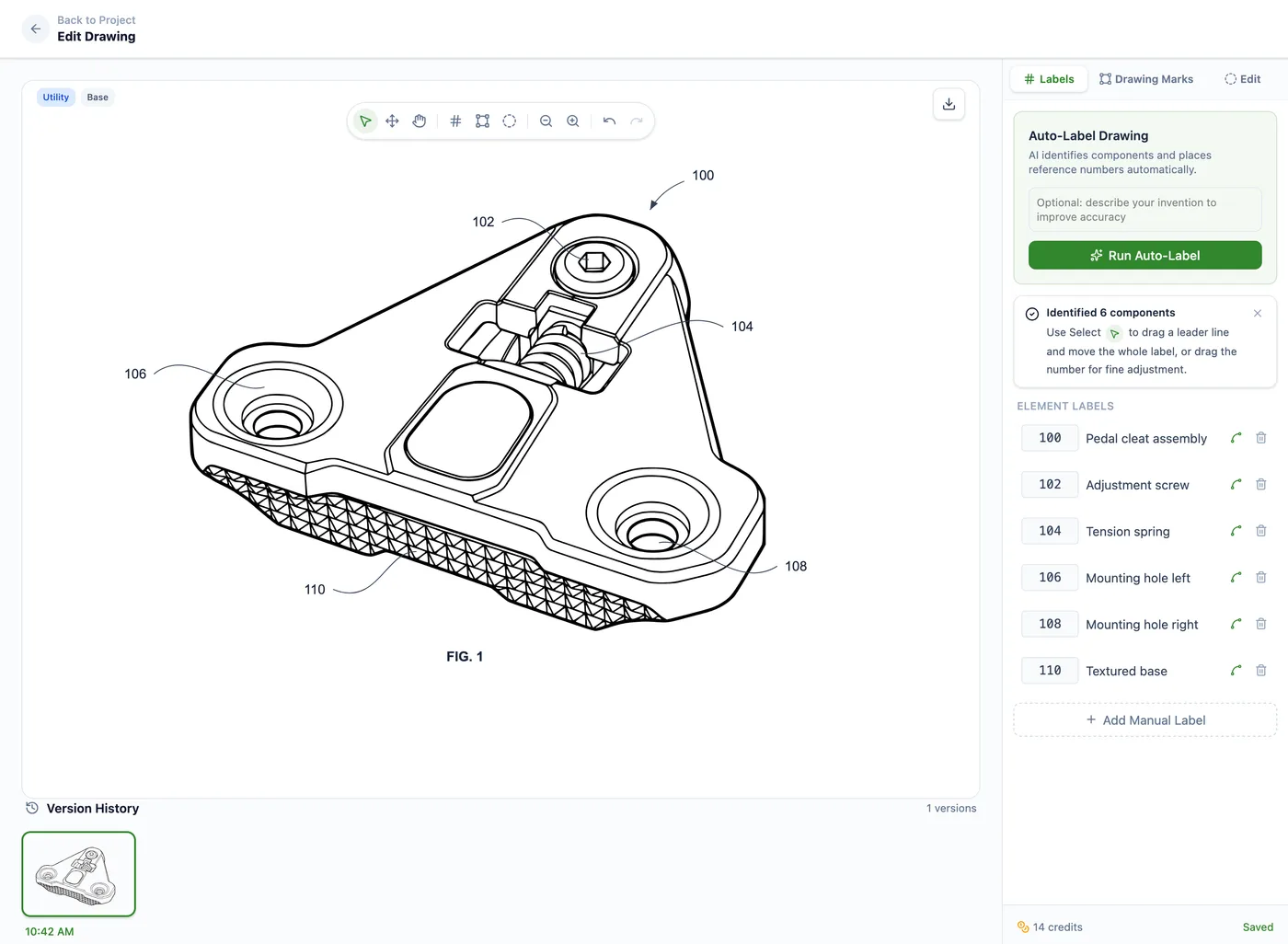
PatentDrawingAI drawing editor
Why PatentDrawingAI Is Not Just Generic AI
PatentDrawingAI is not just an image model that returns a drawing. After generation, the workflow supports cleanup, line-art preparation, reference numeral placement, manual annotations, formal sheet assembly, and filing-ready export in the same browser session.
That matters because patent drawings are not finished when an image looks clean. The drawing set still needs consistent labels, legible reference characters, sheet numbering, margins, figure labels, and PDF, PNG, or SVG export. PatentDrawingAI keeps those production steps together instead of sending the filer into a vendor queue.
Cost, Turnaround, and Revision Reality
Published patent illustration pricing is not standardized. Some providers price per sheet, some quote by complexity, and some include a limited number of revision rounds. That makes a clean provider-by-provider dollar claim fragile unless you are looking at a current quote. For a fuller breakdown by provider type, filing scenario, and AI credit math, see our patent drawing cost guide.
PatentDrawingAI is easier to model. Plans start at $19 per month, and new drawings typically work out to about $2 to $4 each depending on plan. AI redraw edits cost about $0.40 to $0.76 each. Auto-Label, manual annotation, Drawing Set assembly, Matter Management, and PDF/PNG/SVG export are included in the workflow.
The Hidden Variable Is Queue Time
A patent drawing service or illustrator can produce strong drawings, but the calendar delay often comes from the service loop: intake, quote, clarification, first delivery, markup, revision, and final delivery. PatentDrawingAI keeps those steps inside the same browser workflow.
USPTO Formatting: Creation Method Is Not the Rule
The USPTO does not bless a drawing because it came from a person, and it does not reject a drawing merely because AI helped create it. The practical question is whether the finished drawing set is clear, legible, internally consistent, and formatted for the applicable rules, including 37 CFR 1.84 requirements.
- Sheet size and margins must leave the usable sight area clear.
- Lines, labels, and reference characters must stay legible.
- Figures need clear numbering and consistent reference signs.
- Photos, color, and grayscale treatment need special care and may require a petition or correction depending on context.
PatentDrawingAI's role is to help create and assemble drawings formatted for that review. It does not provide legal advice, and final filing review remains the user's responsibility.
Decision Framework
| Scenario | Recommendation | Why |
|---|---|---|
| Independent inventor with clear sketches or product photos | Start with PatentDrawingAI | The cost and turnaround advantage is highest when the source material is clear and the filing is US-focused. |
| Patent paralegal preparing many routine utility figures | Use PatentDrawingAI as the default | Matter Management, Auto-Label, sheet assembly, and reusable export flow remove repeat coordination work. |
| Design patent where surface shading defines claim scope | Use specialist review only for shading strategy | PatentDrawingAI can support clear source-view conversion, while unusually subtle shading or broken-line strategy may justify specialist judgment. |
| Dense mechanical assembly with many hidden parts | Start with PatentDrawingAI for clear views | Use the self-serve workflow when source images are clear; use an illustrator only when the layout itself requires interpretation. |
| Firmware, electronics, software, or process diagrams | Start with PatentDrawingAI | Diagrammatic content is often easier to generate, label, revise, and assemble directly in software. |
| Client expects a fully outsourced vendor workflow | Use an illustrator or drafting service | A service provider may be the better fit when the buying need is vendor accountability, not direct editing speed. |
If the decision is less about hiring a service provider and more about choosing the right self-serve tool, compare workflow categories in our best patent drawing software guide.
A Practical Workflow for Firms
For law firms and patent teams, the advantage is not only generation speed. Matter Management lets teams organize drawing projects by client matter, docket number, responsible attorney, and drawing type, import matter lists from CSV, and export matter-based usage for billing or internal review.
- Use PatentDrawingAI first for ordinary utility, software, electronics, process, and clear product-view drawings.
- Assemble the drawing set in the app so margins, sheet numbering, figure labels, and reference-character sizing are handled consistently.
- Review the output against the claims and specification before filing. The user or attorney remains responsible for final legal and disclosure review.
- Use an illustrator only for the exceptions: done-for-you service requirements, specialist design shading strategy, unusually ambiguous source material, direct native CAD drafting, or office-specific adaptation.
Compare on Your Own Invention
Upload a sketch, photo, screenshot, or CAD render exported as an image. Generate a drawing in about 1 to 3 minutes, then label, assemble, and export a filing-ready drawing set without waiting on a vendor queue.
Try PatentDrawingAI FreeFrequently Asked Questions
For many routine utility, design, software, electronics, and mechanical drawing workflows, yes. PatentDrawingAI is designed to generate filing-ready line drawings, add labels, assemble sheets, and export the final set. A patent illustrator still fits narrower cases where the buyer specifically needs a done-for-you vendor, direct native CAD drafting, office-specific adaptation, or specialist design-patent shading judgment.
The USPTO does not pre-approve drawings by creation method. OPAP reviews drawings for issues such as margins, paper size, line quality, legibility, figure labels, photos, and color. AI-created drawings can be filed when the finished drawing set satisfies the same 37 CFR 1.84 requirements as a manually illustrated set.
A patent illustrator can act as a service provider: interpreting rough inventor notes, choosing views, applying specialist design shading, handling native CAD files, and managing revisions through a vendor relationship. PatentDrawingAI gives the filer direct control over generation, edits, labels, formal sheet assembly, and export, but it does not replace legal review or the filer's responsibility for the final set.
PatentDrawingAI plans start at $19 per month. New drawings usually work out to about $2 to $4 each depending on plan, and AI redraw edits cost about $0.40 to $0.76 each. Published illustrator pricing varies by provider, subject matter, turnaround, and revision policy, so compare against a quote for the specific filing.
Yes. The filing concern is the final drawing set, not whether every figure came from one production method. Many teams use PatentDrawingAI as the default workflow for routine figures and fast revisions, then use an illustrator only for figures that genuinely require a done-for-you service or specialist judgment.